
Replit AI को सिर्फ “game banana hai” जैसे साधारण prompt मत दो। Game का नाम, controls, screen size, एक specific mechanic, और expected output — यह सब एक prompt में होना चाहिए। जितना specific prompt, उतना बेहतर result मिलता है।
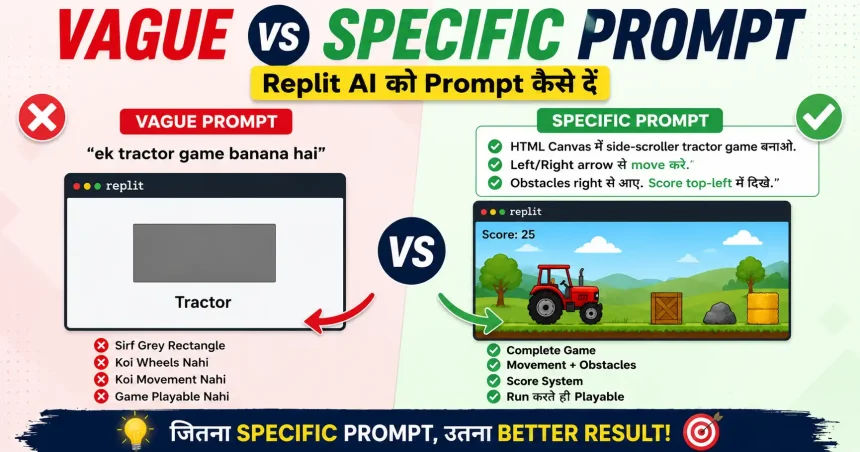
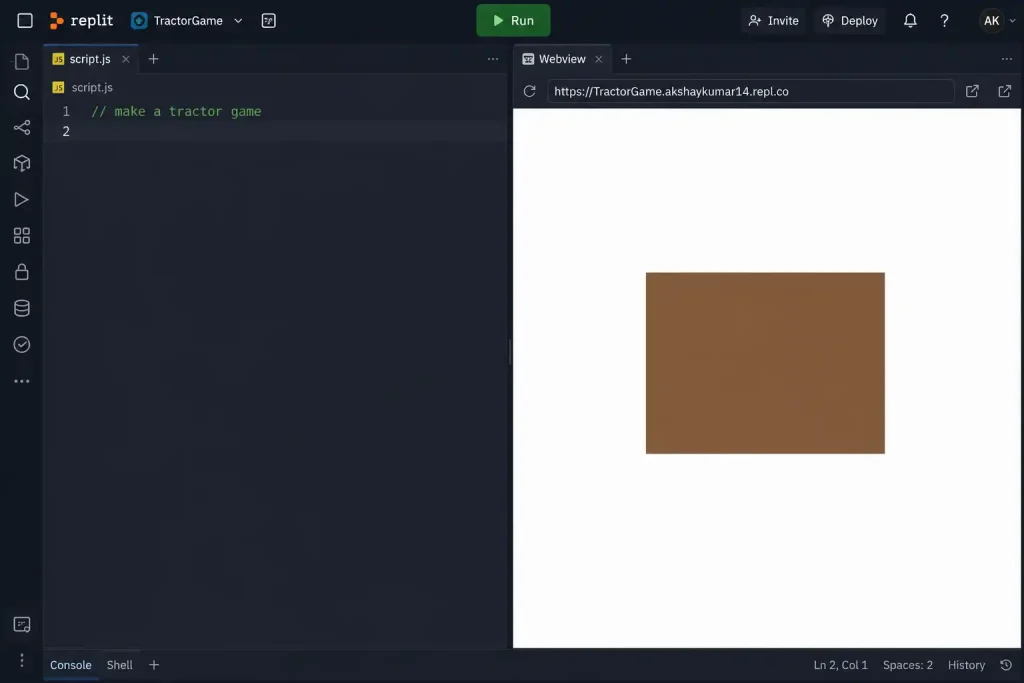
जब मैंने पहली बार Replit AI में लिखा: “ek tractor game banana hai“
AI ने tractor की जगह एक grey rectangle बना दिया। नीचे सिर्फ “Tractor” लिखा था। ना wheels, ना ground, ना movement। AI ने ट्रेक्टर के नाम पर बस एक box बनाकर दिया था |
HTML Canvas projects में AI कई बार शुरुआत basic shapes से करता है। Canvas drawing का base भी rectangle, circle और दूसरी simple shapes होती हैं, इसलिए vague prompt मिलने पर AI अक्सर object की जगह सिर्फ एक basic shape बना देता है।
यही वो moment था जब पहली बार मेरा ध्यान गया — AI को “समझ” नहीं, instruction चाहिए होती है।
जब हम One Line में Replit AI को बोलते है – “ek tractor game banao” तो पहले वो समझ नहीं पता की किस programing language में build करवाना चाहते हो | और तो हम को ये भी लगता है की इस तरह prompt देने पर AI खुद से समझकर Advance 3D game बनाकर देगा, लेकिन वो तो एक simple एंड old type का 2D game बनाकर दे देता है |
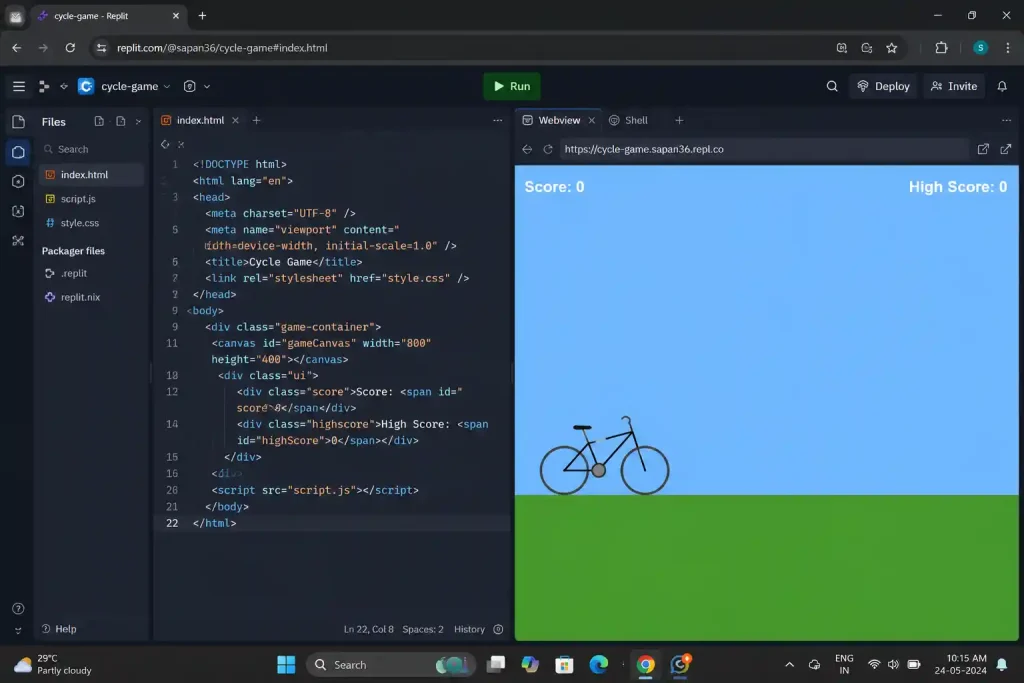
यह problem html based tractor game में नहीं आई बल्कि Cycle game, snake game में भी बनाते समय face की थी। एक pattern जिसको समझने के बाद, तब से कोई भी game में Math rectangle shape वाली problem नहीं आई |
इस article में वही फर्क दिखाऊंगा जो vague और specific prompt के बीच होता है — real examples के साथ जो मैंने खुद try किए।
AI सब कुछ समझ लेता है” — यह सोच ही गलत है
बहुत लोग Replit AI जैसे अन्य AI tool editor के बारे में यह सोचते है कि AI intelligent है — तो वह खुद समझ जाएगा कि game कैसा बनाना है।
जो beginners है उनको मैं बता दूँ, AI एक pattern matcher है, Mind reader नहीं। तुम जब “build tractor game” लिखते हो, AI अपने training data में देखता है कि “tractor game” के साथ सबसे common output क्या रहा है — और वही generate करता है। तुम्हारा imagination और AI का default pattern आपस में sync नहीं होते।
इसीलिए जब मैंने सिर्फ “ek tractor game banana hai” लिखा, तो AI ने वही बनाया जो prompt में लिखा था — tractor को represent करने वाला एक basic shape। Screen पर सिर्फ rectangle था, बाकी wheels, ground और movement जैसी चीज़ें थीं ही नहीं।
मेरा Personal Note 1 — Tractor Game article लिखते वक्त पहली screenshot देखी थी — grey box, “Tractor” label, कुछ नहीं। पहले लगा Replit AI ने bug किया। फिर समझा — मैंने ही incomplete instruction दी थी। Tractor game में यही पहली गलती थी — और वह article लिखने की वजह भी यही moment था।
Vague Prompt क्या होता है? — 3 Real Examples
नीचे 3 games, 3 अलग prompts — तीनों में same pattern:
| Vague Prompt | AI का Output | Real Issue |
| “Ek tractor game banana hai” | Grey rectangle, zero movement | Game का कोई visual या mechanic detail नहीं था |
| “Snake game banana hai” | Basic grid, default color, fixed speed | Speed, color, grid size — सब AI ने decide किया |
| “Cycle game banana hai” | Cycle बनी, लेकिन gravity नहीं थी | Jump mechanic specify ही नहीं की थी |
Output में AI game दे, जब Run करके चेक करो — तीन में से एक भी immediately game playable नहीं होगा।
Tractor Game में Replit AI ने सिर्फ rectangle बना दिया था, Snake में color इतनी light थी कि grid पे दिख नहीं रहा था। Cycle Game में gravity की problem थी।
मेरा Personal Note 2 — Cycle Game में एक बार ऐसा भी हुआ कि cycle jump तो कर रही थी, लेकिन नीचे वापस ही नहीं आ रही थी। बाद में पता चला कि prompt में gravity का ज़िक्र ही नहीं था। सिर्फ एक line की कमी थी, लेकिन उसे समझने और fix करने में करीब 20 minute निकल गए।
Specific Prompt का Formula — 5 चीजें जो हर Prompt में होनी चाहिए
ये structure मैंने practical testing में इस्तेमाल किया है, और prompt engineering best practices भी clear, specific instructions देने पर जोर देती है |
1. Game का नाम + type
सिर्फ नाम नहीं — type भी बताओ।
| ❌ Vague | ✅ Specific |
| “Tractor game” | “HTML Canvas-based side-scroller tractor game” |
2. Controls
Exactly कौनसी keys, क्या काम करेंगी।
“Arrow keys: left/right movement. Spacebar: jump.”
3. Screen size
AI को पता होना चाहिए कितनी जगह है।
“800×400 canvas size”
4. एक specific mechanic
सिर्फ एक — जो game को game बनाती हो।
“Obstacles randomly right से आते रहें। हर obstacle miss करने पर score बढ़ता रहे।”
5. Expected output
Final result कैसा दिखना चाहिए।
“Game immediately playable हो — कोई extra setup नहीं। Score top-left में दिखे।”
Before / After — Same Game, दोनों Prompts
❌ Vague:
“Ek platform runner game banana hai jisme character jump kare.”
✅ Specific:
“HTML Canvas mein ek platform runner game banana hai. Character left/right arrow se move kare, Space se jump kare. 800×400 canvas size. Obstacles right se randomly aate rahein. Score top-left mein dikhao. Game over screen ho jab character gire ya screen se neeche jaaye.”
दोनों prompts एक ही game के लिए हैं। लेकिन specific prompt में पहली बार run करने पर एक काम करता हुआ game मिलेगा।
मेरा Personal Note 3 — Platform Runner Game में पहली बार जब मैंने detailed prompt दिया, तो output perfect नहीं था, लेकिन इस बार screen पर सिर्फ rectangle नहीं था बल्कि Character था, movement थी, platforms और obstacles भी थे। वहीं पहली बार समझ आया कि Replit AI से game बनवाने में सबसे बड़ा फर्क prompt की quality में है।
Replit AI को Prompt देने का तरीका — Simple Prompt Template
अगर आप Replit AI से बेहतर output चाहते हैं, तो सिर्फ “game bana do” या “website bana do” जैसी one-line instruction मत दें। Prompt में project की details जितनी clear होंगी, AI का पहला output उतना ही usable होगा।
मैं आमतौर पर शुरुआत prompt के तौर पर नीचे वाला template follow करता हूँ:
Temple Prompt
Project:
[क्या बनाना है]
Programming Language:
[HTML/CSS/JavaScript, Python, React आदि]
Features:
- Feature 1
- Feature 2
- Feature 3
Controls (अगर लागू हो):
- Left Arrow:
- Right Arrow:
- Spacebar:
Design / UI:
- Color theme
- Layout
- Style
Screen Size (अगर लागू हो):
- 800×400
- Responsive layout
Expected Output:
- Project run होते ही काम करे
- Error-free code हो
- Required functionality पूरी हो
Restrictions:
- External libraries use न करें
- Single file में code दें
- Mobile-friendly बनाएं
Template Prompt With Example
Project:
HTML Canvas based tractor game
Programming Language:
HTML, CSS aur JavaScript
Features:
- Tractor left aur right move kare
- Random obstacles aayein
- Score system ho
Controls:
- Left Arrow: Move Left
- Right Arrow: Move Right
Design:
- Green field background
- Visible tractor wheels
Screen Size:
800×400 canvas
Expected Output:
Game page load hote hi playable ho.
Score top-left mein dikhe.
Game over screen ho.
Restrictions:
External libraries use na karo.
One more step— Conversation Fresh करना भी Prompt Strategy है
यह step ज्यादातर लोग miss करते हैं।
जब तुम एक ही conversation में game बनाते हो, bugs fix करते हो, नई features माँगते हो — Replit AI के पास उस conversation का सारा context होता है। कई बार यह help करता है। लेकिन कई बार AI confuse हो जाता है — पहले का कोई fix नए feature से clash करता है और AI दोनों को balance करने की कोशिश में कुछ नया bug generate कर देता है।
तब सबसे आसान fix यह है — current chat बंद करो, नया chat window शुरू करो, और clean prompt दो।
मेरा Personal Note 4 — Snake game में एक bug था जो दो attempts में fix नहीं हुआ। तीसरी बार chat window new start की, same bug का description नए prompt में दिया जो एक बार में fix हो गया। Context clean था जिससे Replit AI ने targeted issue को हि fix किया बिना other code को edit किए।
Run करके output check करो। अगर उसी conversation में 4–5 fixes के बाद भी नई-नई दिक्कतें आती जा रही हैं, तो एक fresh conversation में current code और problem देकर दोबारा शुरू करना कई बार आसान होता है।
Bug Table — Prompt Mistakes Quick Reference
| गलती | क्या होता है | Fix |
| सिर्फ game का नाम देना | Bland, incomplete output — rectangle या basic shape | नाम + controls + mechanic + screen size सब दालो |
| एक prompt में बहुत कुछ माँगना | AI कुछ features miss करता है या गलत implement करता है | एक feature एक prompt — step by step आगे बढ़ो |
| Fix माँगना बिना error describe किए | AI गलत चीज fix करता है | Exact bug लिखो — “यह हो रहा है, यह होना चाहिए” |
| पुराने conversation में नया game बनाना | पहले game का context नए game में आता है | Fresh conversation शुरू करो |
Disclaimer
यह article Replit का sponsored content नहीं है। मैंने खुद यह games बनाए हैं — जो bugs मैंने face किए, जो prompts काम आए, वही यहाँ लिखे हैं।
FAQ
Q1. Replit AI को prompt देने का सही तरीका क्या है?
Game का नाम, type, controls, screen size, एक specific mechanic, और expected output — यह सब एक prompt में होना चाहिए। जितना specific, उतना better पहला output।
Q2. Vague prompt देने से exactly क्या होता है?
AI अपना default pattern use करता है — जो ज्यादातर एक bland, incomplete output होता है। Tractor game में सिर्फ एक grey rectangle आया था। इसीलिए specific instruction जरूरी है।
Q3. क्या एक prompt में पूरा game बन सकता है?
Basic game बन सकता है — लेकिन features step-by-step add करना better है। एक prompt में ज्यादा माँगो तो AI कुछ features miss कर देता है।
Q4. Prompt लिखते time कौनसी 5 चीजें जरूरी हैं?
Game नाम + type, controls, screen size, एक mechanic, और expected output। यह 5 cover करो — पहला output काफी better आता है।
Q5. AI बार बार गलत output दे रहा है — क्या करें?
पहले check करो prompt specific था या नहीं। फिर देखो conversation में कितने fixes हो चुके हैं — अगर ज्यादा हैं तो fresh conversation try करो। यह दोनों चीजें मिलके 80% cases में काम करती हैं।