
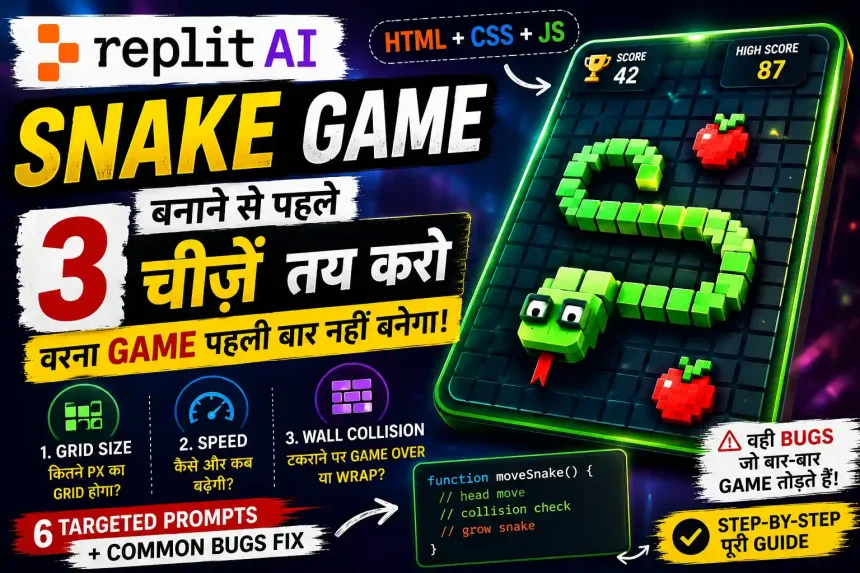
मैं beginner हूँ और vibe coding को follow करते हुए, किस तरह Replit AI से HTML, CSS और JS में Snake Game बनाया — यही इस guide में step-by-step बताया है। लेकिन Replit AI को prompt देने से पहले grid size, speed और wall collision जैसी 3 basic चीज़ें पहले तय करनी पड़ती हैं। ये उसी experience के आधार पर यह guide लिखी है।
Quick Answer: Replit AI से HTML Snake Game बनाने से पहले 3 चीज़ें पहले तय करनी पड़ती हैं — grid size, game speed और wall behavior। क्योंकि अगर इनके बिना सीधा prompt दोगे, तो बाद में snake movement और collision वाला part बार-बार bug create कर सकता है। मैंने खुद try करते समय यही देखा था। उसके बाद game को 6 छोटे prompts से पूरा बनाया।
Nokia 3310 पर snake game खेला है? वो जिसमें एक line बढ़ती जाती थी और red food खाने के चक्कर में कभी-कभी खुद को ही काट लेता था और game over हो जाता था। मुझे अभी भी याद है — school के time lunch break में snake खेलते-खेलते मेरा score करीब 42 तक गया था, और उसी चक्कर में खुद से टकराकर game over हो गया था।
Nokia 3310 India में शायद सबसे ज़्यादा उसी एक game की वजह से याद रखा जाता है — और वही snake मैंने Replit AI पर दोबारा बनाने की कोशिश की।
मैंने सोचा था की ये game भी cycle game जैसा ही होगा। Replit AI को prompt दो, game बन जाएगा। लेकिन जो मेरा पिछला Cycle Game बनाते समय जो experience मिला जिसकी वजह से इस game को complete करने में कोई problem नहीं हुई |
Tractor Game की तरह, जब पहले prompt के बाद जो output आया वो snake नहीं था। एक line थी जो screen पर सीधी चलती जाती थी और कभी मुड़ती नहीं थी, चाहे Arrow key दबाओ या कुछ भी। लेकिन जब फिर से key press की तो अचानक snake की speed double हो गई।
तब समझ आया कि snake game का prompt देने का concept अलग है।
हाँ, इस line में intent अच्छा है, बस meaning थोड़ा और clear किया जा सकता है ताकि reader तुरंत समझ जाए guide में उसे क्या मिलने वाला है।
तुम्हारे context और style के हिसाब से इसे ऐसे लिखा जा सकता है:
मैंने इस Snake Game को खुद Replit AI पर बनाकर देखा — बीच में game कई बार break हुआ, कुछ prompts दोबारा देने पड़े, और कई छोटी errors भी मिलीं। उन्हीं try, error और fixes से यह guide बनी है।
इसमें prompt देने से पहले तय करने वाली 3 जरूरी चीज़ें हैं, फिर 6 targeted prompts हैं, और साथ में उस bug का solution भी है जो Snake Game बनाते समय सबसे ज़्यादा आता है |
लेकिन Internet पर Hindi में इसके बारे में detail में बहुत कम बताई गई है।
Snake Game Cycle Game से Fundamentally अलग क्यों है
Cycle game में एक object move करता है। Position update होती है — x बढ़ा, y घटा, बस।
Snake game में एक array move करती है।
Snake की body के हर segment का position track होता है। जब snake मुड़ती है, तो सिर्फ head नहीं मुड़ता — बाकी सारे segments एक-एक करके अगले segment की position पर आते हैं।
इसको ऐसे सोचो — जैसे train के डिब्बे। Engine मुड़ा, तो उसके पीछे वाला डिब्बा उसी मोड़ पर आएगा, फिर उसके पीछे वाला, और आगे भी। Snake बिल्कुल ऐसे ही काम करती है।
इसी तरह हर move में snake का array इस तरह update होता है:
// Snake जब right move करे — एक step
पहले: [ {x:100, y:100}, {x:80, y:100}, {x:60, y:100} ]
↑ head ↑ tail
बाद में: [ {x:120, y:100}, {x:100, y:100}, {x:80, y:100} ]
↑ नया head पुरानी positions shift हुईं tail हटा
Cycle game में सिर्फ एक {x, y} था। Snake में यह पूरी list है जो हर frame update होती है — यही fundamentally अलग है।
यही वजह है कि Replit AI को Snake Game के लिए Cycle Game से थोड़ा अलग तरह से instructions देनी पड़ती हैं। Cycle Game में जो prompt सही काम कर रहा था, वही यहाँ देने पर वैसा output नहीं मिला। मैंने खुद इसे try करते समय यही notice किया था।
एक और बात — snake game grid-based होता है। Cycle freely move करती थी। Snake एक invisible grid पर move करता है — हर move एक पूरे cell के बराबर होती है। यही grid पूरे game का foundation होता है।
Prompt देने से पहले — तीन Decisions लेने होते हैं
ये तीन decisions अगर पहले नहीं लिए तो बाद में update या कुछ changes करना पड़े और तब Replit AI पूरा collision function जैसे और भी जरुरी function को rewrite करने के chance बढ़ जाते है, नए bugs आते हैं और उनको fix करना और भी ज्यादा मुश्किल हो जाता है |
Note: पहले decide करो, फिर prompt दो।
Decision 1 — Grid Size क्या होगी?
Grid size मतलब — canvas पर हर cell कितने pixels का होगा।
20px grid पर 400px canvas में 20 cells बनेंगी। Snake हर move में एक cell आगे बढ़ेगी।
समझो इस लाइन का क्या मतलब है और कैसे कैलकुलेट की जाती है “20px grid पर 400px canvas में 20 cells बनेंगी।” ?
20px grid का मतलब है एक box की width 20 pixels है। हमारा canvas 400px चौड़ा है। अब 400 को 20 से divide करेंगे:
400 ÷ 20 = 20
मतलब एक row में 20 boxes आ जाएंगे। ऊपर से नीचे भी 20 boxes बनेंगे। इसलिए पूरा game area 20 × 20 grid में divide हो जाता है। उसी grid के एक box से दूसरे box में snake move करती है।
Grid size से ये decide होता है:
- Snake कितनी thick दिखेगी
- Game का feel fast होगा या slow
- Food कितना छोटा या बड़ा दिखेगा
लेकिन यहाँ एक चीज़ सबसे ज़्यादा ध्यान रखने वाली है — grid size और canvas size एक-दूसरे से सही match होने चाहिए।
Canvas width, grid size का exact multiple होना चाहिए।
400px canvas और 20px grid रखने पर 400 ÷ 20 = 20 — यानी पूरे canvas में 20 बराबर cells बनती हैं। लेकिन 15px grid पर 400 ÷ 15 = 26.6 आता है। यही decimal value AI को confuse कर सकती है, जिससे snake या collision सही align नहीं होता।
Recommendation: अगर पहली बार Snake Game बना रहे हो, तो शुरुआत के लिए 20px grid और 400×400 canvas सबसे आसान और stable रहता है।
मैंने पहली बार 10px grid रखी थी — snake इतनी पतली थी कि food दिख ही नहीं रहा था।और ऐसा लग था की Screen पर एक धागा रेंग रहा हो |
Decision 2 — Speed कैसे बढ़ेगी?
हमारे पास दो options हैं:
Score-based: हर 5 food के बाद game की speed बढ़ती है। इससे player को शुरुआत में control मिलता है, और जैसे-जैसे score बढ़ता है game थोड़ा challenging होने लगता है।
Time-based: हर 30 seconds बाद game की speed अपने आप बढ़ती है। इसमें game खुद तय करता है कि कब fast होना है, चाहे player का score कुछ भी हो।
Snake Game में speed setInterval की time value से control होती है। जैसे शुरुआत 150ms से होगी, फिर next level पर 130ms और उसके बाद 110ms — जैसे-जैसे यह value कम होगी, snake तेज़ चलता महसूस होगा।
मैंने पहले time-based speed try की थी। लेकिन कुछ देर बाद game repeat सा लगने लगा, क्योंकि player कुछ भी करे लेकिन कुछ time बाद speed बढ़नी ही थी। जिससे 2 minute बाद खेलने में वही repeat feel आने लगती और game में User Experience ख़राब होता है |
मेरी सलाह: हर 5 food के बाद speed 15ms कम होती जाएगी। लेकिन इसे minimum 80ms पर रोकना ज़रूरी है, क्योंकि इसके नीचे snake इतनी तेज़ हो जाती है कि control करना मुश्किल हो जाता है।
Decision 3 — Wall (Boarder) से टकराने पर क्या हो?
Game Over: यह classic Nokia वाला mode है जब snake के wall touch होते ही game over हो जाता था |
Wrap-around: दाईं wall से निकलो तो बाईं से आ जाओ। Beginners के लिए ज़्यादा fun।
यह पहले तय करना ज़रूरी है, क्योंकि दोनों modes का code अलग होता है। Game Over mode में snake wall touch करते ही रुक जाती है, जबकि Wrap-around mode में snake एक side से निकलकर दूसरी तरफ दिखाई देती है।
अगर इसे बाद में change करोगे, तो AI को पूरा collision वाला code दोबारा लिखना पड़ेगा — और उसके साथ कई बार game का कोई दूसरा part भी change हो जाता है।
मेरी recommendation यही है — अगर game किसी client को deliver करना है तो Game Over mode रखो। और अगर अपने लिए या fun के लिए बना रहे हो, तो Wrap-around ज़्यादा मज़ेदार लगता है।
या Client से उसकी डिमांड पूछ सकते हो की Game Over mode में क्या रखना है |
Replit Setup — बस 10 Minute में तैयार
- replit.com पर जाओ
- + Create Repl → HTML, CSS, JS template → नाम: snake-game
- Create Repl — हो गया
एक important note जो cycle article में नहीं था:
Snake Game के लिए शुरुआत में सिर्फ एक index.html file रखना आसान रहता है। Replit AI कई बार अलग game.js file बना देता है, और वहीं canvas link miss हो जाए तो screen blank आ सकती है। इसलिए पहले prompt में ही साफ लिख दो — पूरा code (CSS, JS) एक ही HTML file में रखना है।
हर prompt के बाद Run दबाओ और output check करो। अगर सब कुछ तुम्हारे according है तभी अगला prompt दो।
Replit AI को ये 6 Prompt दो — एक-एक करके
Prompts की list नहीं दे रहा — हर काम के पीछे क्या हो रहा है वो भी बता रहा हूँ। क्योंकि अगर output expected नहीं आया तो तुम खुद समझ सको कि कहाँ गड़बड़ हुई।
Prompt 1 — Canvas बनाओ और Grid Define करो
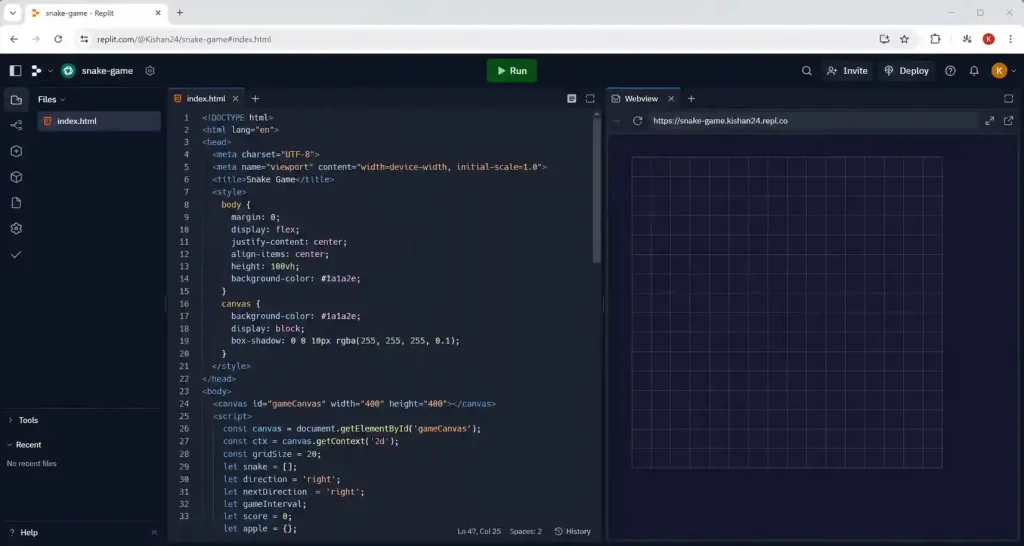
Create a single HTML file with embedded CSS and JavaScript for a snake game.
Use an HTML5 canvas of 400×400 pixels.
Define a grid size of 20px — the entire game must be based on this grid.
Draw a dark background (#1a1a2e) on the canvas.
Draw a grid outline in very subtle dark lines so cells are barely visible.
Do not add any snake or movement yet — only the canvas and grid.
Keep all code in one HTML file.
इस prompt में क्या instruction है:
Grid सबसे पहले सही set करनी है — बाकी सब उसके बाद आता है। अगर शुरुआत में grid गलत हुई, तो आगे आने वाले prompts में snake movement, food position और collision तीनों का output गड़बड़ हो सकता है।
Expected output: Laptop screen पर एक Dark background वाला 400×400 canvas होना चाहिए जिसमें Subtle grid lines दिखें।
Note: अगर पहली बार canvas use कर रहे हो, तो HTML Canvas API का basic example एक बार देख सकते हो — इससे canvas कैसे draw होता है जल्दी समझ आ जाएगा।
अगर Run करने पर screen खाली आए, तो F12 दबाकर Console check करो कि कोई red error दिख रही है या नहीं। अगर canvas is null लिखा आए, तो HTML में <canvas id="gameCanvas"> tag है या नहीं — एक बार check कर लो।
अगर canvas is null error आ रही है या HTML में <canvas id="gameCanvas"> tag missing है, तो Replit AI को यह prompt दे सकते हो:
Canvas element is missing or returning null.
Add inside the HTML body.
Make sure JavaScript selects it using:
const canvas = document.getElementById(‘gameCanvas’);
and initialize the drawing context correctly.
यह prompt देने पर AI canvas tag वापस add कर देगा और JavaScript को उसी canvas से connect भी कर देगा।
Prompt 2 — Snake को Move करो (With Array Logic)
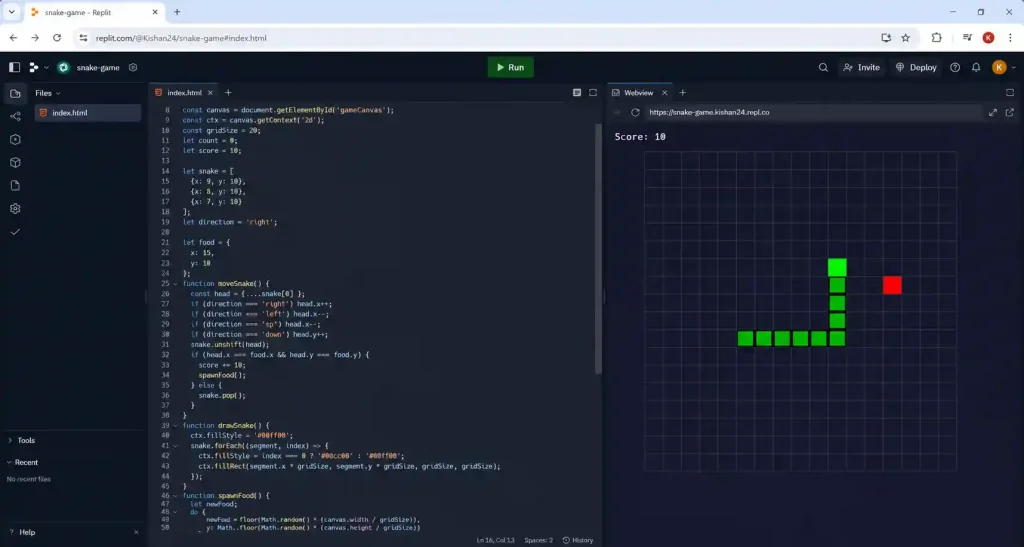
Add a snake to the game.
The snake is an ARRAY of segments — start with 3 segments.
Initial position: center of canvas, moving right.
Snake moves one grid cell per step using setInterval at 150ms.
Each step: add new head in the direction of movement, remove last tail segment.
Arrow keys change direction — but snake cannot reverse direction directly
(if moving right, left arrow should be ignored).
Draw each segment as a rounded rectangle in green (#00ff88).
यह prompt क्यों important है:
दो lines notice करो — “snake is an ARRAY” और “cannot reverse direction directly”।
Array explicitly mention करना ज़रूरी है — वरना AI कभी-कभी snake को एक single object बना देता है जो सिर्फ head move करता है, body नहीं।
Reverse direction का mention यहीं से करना ज़रूरी है — बाद में add करना मुश्किल होता है।
Bug: Snake move करती है लेकिन body नहीं दिखती — सिर्फ head दिख रहा है। तब इस follow up prompt से fix कर सकते है –
The snake is moving but only the head is visible, body segments are not rendering.
Check if the snake array has multiple elements and if each segment is being drawn in the loop.
Add console.log(snake.length) to verify array has 3 elements.
Note: अगर arrow key press detect नहीं हो रही हो, तो KeyboardEvent key values reference useful रहेगा — यहाँ key names (ArrowUp, ArrowLeft) exactly दिख जाते हैं।
Prompt 3 — Food Spawn करो (और एक Hidden Problem है)
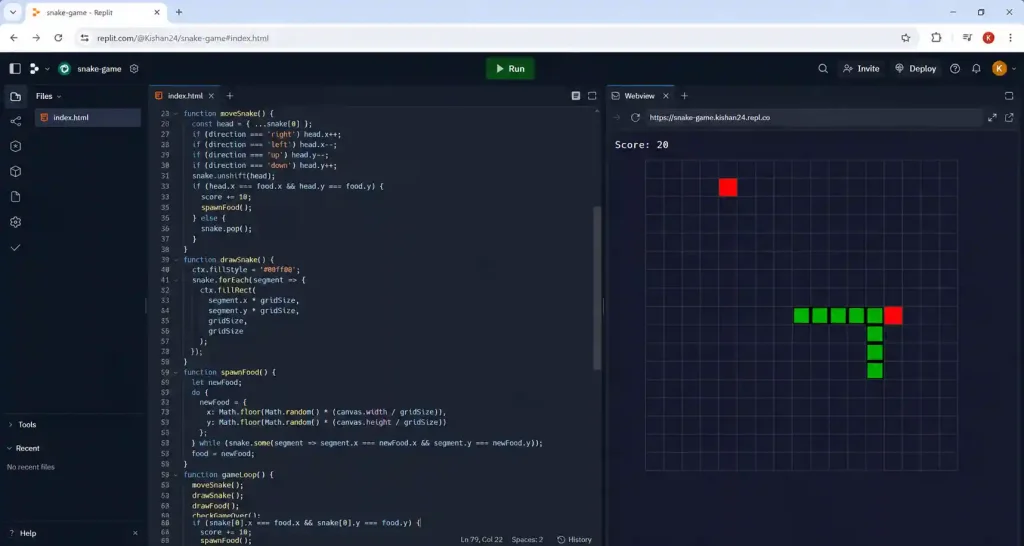
Add food to the game.
Food spawns at a random grid-aligned position on the canvas.
Draw food as a red circle (#ff4757) centered in its grid cell.
When snake’s head reaches food position: increase score by 10, spawn new food.
IMPORTANT: Food must never spawn inside the snake’s body.
Check food position against all snake segments before placing it.
यह hidden bug जो सबसे ज़्यादा आता है:
कई बार food snake की body के अंदर spawn हो जाती है। Screen पर दिखाई नहीं देती, लेकिन जैसे ही snake उस cell पर पहुँचती है score अचानक बढ़ जाता है।
मैंने भी खुद यही notice किया था। Score अचानक +10 हो गया बिना कुछ snake के खाए। Console से ढूंढा तो पता चला — food snake की body के नीचे छुपी थी।
इसीलिए prompt में explicitly लिखा है: “Food must never spawn inside the snake’s body।”
अगर food snake के अंदर spawn हो रहा हो तब ये prompt दे:
Food is spawning inside the snake body.
The food spawn function should:
1. Generate a random grid position
2. Check if that position exists in the snake array
3. If yes, generate again
4. Repeat until a free cell is found
Prompt 4 — Snake को Grow करो जब Food खाए
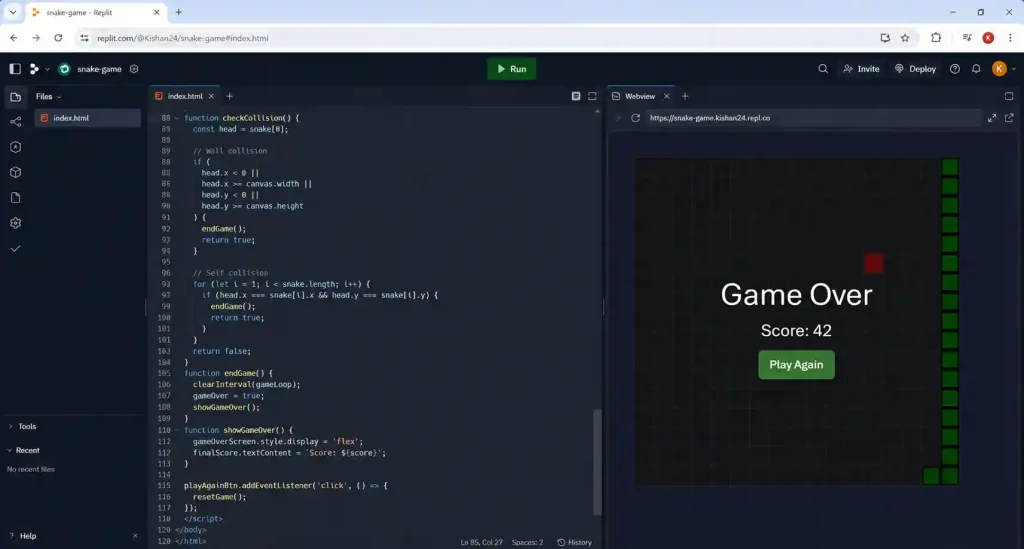
When snake eats food, the snake should grow by one segment.
Current logic: each step adds new head AND removes tail.
When food is eaten: add new head but do NOT remove the tail this step.
This adds one segment to the snake’s length.
Test: snake should visibly grow after eating food.
यह समझना ज़रूरी है:
Normal movement में snake का head आगे बढ़ता है और पीछे से tail हट जाती है। इससे snake move करती रहती है, लेकिन उसकी length उतनी ही रहती है।
Food खाने पर — head आगे जाता है, tail नहीं हटती। Length एक बढ़ जाती है।
Food खाने पर snake का head आगे बढ़ता है, लेकिन इस बार tail नहीं हटती। इसी वजह से उसकी length एक block बढ़ जाती है।
Bug fixing prompt: इससे पूरा snake एक साथ grow होता है:
Snake is growing by multiple segments at once instead of one.
The grow logic should only skip tail removal for ONE frame when food is eaten.
Use a boolean flag ‘justAteFood’ — set true when food eaten, set false after skipping tail removal once.
Prompt 5 — Collision लगाओ (और वो Bug जो सबसे ज़्यादा होता है)
Add collision detection:
1. Wall collision: if snake head goes outside canvas boundaries, game over.
2. Self collision: if snake head position matches any body segment position, game over.
When game over: stop the game loop (clearInterval), set gameOver = true.
Expected output: Snake wall से टकराए या खुद से टकराए — game रुक जाए।
अब वो bug जो English articles में mention है लेकिन Hindi में fix prompt किसी ने नहीं दिया।
Reverse Direction Self-Kill Bug:
Snake right जा रही है। तुम बहुत तेज़ Left + Up दबाते हो — पहले Left, फिर Up। Same frame में दोनों process हो जाते हैं।
Result: Snake एक frame के लिए left में मुड़ी — खुद की neck से टकराई — game over।
ये Player की गलती नहीं है इसको Bug कहते है।
यह होता है क्योंकि direction change same frame में apply हो जाता है जिसमें snake का next step calculate होता है।
There is a bug: pressing two direction keys quickly causes the snake to reverse into itself and die.
Fix this with a direction queue system:
– Store pending direction in a queue, not directly
– Only apply one direction change per game step
– Validate: new direction cannot be directly opposite to current direction
– Example: if moving right, ignore left input entirely
Queue का मतलब — एक line में:
Queue = waiting line। जैसे ticket counter पर लोग लगते हैं — पहले आया, पहले enter हुआ।
// बिना queue के (buggy):
key press → तुरंत direction change → same frame में snake मुड़ी → dead
// queue के साथ (fixed):
key press → queue में add हुआ → अगले game step पर एक direction निकाला → apply हुआ
Replit AI को ऊपर दिया गया prompt दो — वो queue खुद implement कर देगा। तुम्हें queue manually नहीं लिखनी पड़ेगी।
यह सिर्फ एक prompt लगता है, लेकिन इसके बिना game खेलते समय जल्दी frustration होने लगती है। खासकर जो player तेज़ keys press करता है, उसे यह issue सबसे पहले notice होता है।
Prompt 6 — Score, Speed, Game Over, Mobile Swipe
Score और Speed:
Add score system and progressive speed:
– Display score in top-left: white text, “Score: 0”
– Every 5 foods eaten, increase speed by reducing setInterval delay by 15ms
– Minimum delay: 80ms (do not go below this)
– Display current level in top-right: “Level: 1”, “Level: 2” etc.
– Store interval ID so it can be cleared and restarted with new speed
Game Over Screen:
Add game over screen:
– Semi-transparent dark overlay on canvas
– “Game Over” in large white text (center)
– “Score: [final score]” below it
– “Play Again” button
– Clicking Play Again resets: snake to 3 segments, score to 0, speed to 150ms, gameOver to false
– Restart the game loop fresh
Mobile Swipe:
Add mobile swipe support:
– Detect swipe direction using touchstart and touchend events
– Swipe up = move up, swipe down = move down, swipe left = left, swipe right = right
– Minimum swipe distance: 30px (ignore accidental micro-swipes)
– Add preventDefault() on touch events to stop page scrolling
– Do NOT add on-screen buttons — swipe only
Snake game में on-screen buttons awkward लगते हैं। Swipe natural है — Nokia वाला feel आता है।
Note: अगर mobile swipe पहली बार add कर रहे हो, तो Touch Events API useful reference है — इसमें touchstart और touchend दोनों का example है।
जो गलतियाँ मैंने की थी — तुम मत करना
जब Game पूरा बन गया था। तब Snake move कर रहा था, food भी खा रहा था, score भी update हो रहा था।
मुझे लगा snake थोड़ी sleek लगे, इसलिए 20px grid की जगह 15px करके देख लेते हैं।
यहाँ sleek से मतलब है कि snake थोड़ी पतली और smooth दिखे। 20px grid में snake थोड़ी मोटी लग रही थी, इसलिए 15px करके उसका look थोड़ा cleaner करने का सोचा।
Grid size बदलते ही collision detection सही काम करना बंद कर गई।
Food कभी-कभी wall के बाहर spawn होने लगा। Snake कभी-कभी wall के पास पहुँचे तो game over हो जाता था बिना actually टकराए।
Perosnal-level insight जो tutorial में नहीं मिलेगी:
यह चीज़ मुझे tutorial देखकर नहीं समझ आई थी—खुद game बनाते समय पता चली।
Canvas width, grid size का exact multiple होना चाहिए। इनका relationship ये है:
Canvas cells = Canvas width ÷ Grid size
400 ÷ 20 = 20.0 → Perfect — 20 exact cells 400 ÷ 15 = 26.666… → Decimal — collision math तोड़ देता है
Replit AI कई बार इस decimal grid को ठीक से align नहीं कर पाता। इसी वजह से कभी food ऐसे cell में spawn हो जाती है जो code में तो है, लेकिन screen पर सही जगह दिखाई नहीं देती।
Rule: Grid size change करनी हो तो पहले canvas size भी उसी हिसाब से adjust करो।
- 15px grid चाहिए → 390px या 420px canvas (15 का exact multiple)
- 25px grid चाहिए → 400px या 500px canvas
ये एक line जरुर लग सकती है लेकिन मुझे ये problem solve करने में 1 घंटे से ज्यादा time लग गया था | इसे ignore करने पर घंटे तुम्हारे भी waste हो सकते हैं।
Normal Problem — Fast Solution
| Problem | Real Isse | AI को ये बोलो |
| Screen खाली है | Canvas initialize नहीं हुई या wrong ID | console.log(document.getElementById(‘gameCanvas’)) — null आए तो HTML check करो |
| Snake move नहीं होती | setInterval नहीं चल रहा या wrong canvas context | “Add console.log inside setInterval to confirm it’s running” |
| Snake मुड़ती नहीं | keydown event listener missing | “Log which key is pressed on keydown — check if arrow keys are captured” |
| Food हवा में है | Grid alignment गलत है | “Food x and y must be multiples of gridSize — add Math.floor() to random position calculation” |
| Restart के बाद पुरानी snake | Reset में snake array clear नहीं हुई | “In reset function add: snake = [{x: 200, y: 200}] to reinitialize” |
| Speed बढ़ने पर game crash | पुराना interval clear नहीं हुआ | “Store interval ID in variable, clearInterval before creating new setInterval” |
| Mobile पर swipe काम नहीं | preventDefault missing | “Add e.preventDefault() as first line in touchstart handler” |
Transparency Note
यह game मैंने Replit AI से actually build करके देखा है। Grid size वाला bug और reverse direction self-kill bug — दोनों मैंने खुद face किए थे। Grid size 20px से 15px change करने वाली गलती भी मैंने की थी — इसीलिए उसका exact explanation इस article में है।
Replit एक third-party platform है — features और pricing बदल सकते हैं। Latest जानकारी के लिए replit.com/pricing check करो।
यह article किसी tool के साथ sponsored नहीं है।
FAQ
Q1. Snake game में speed कितनी रखें कि beginners के लिए भी fun हो?
शुरुआत में 150ms रखो। यह Nokia snake की speed के करीब है — familiar feel आता है। Speed progression score-based रखो — हर 5 food पर 15ms कम करो। Minimum 80ms पर रोको। इससे नीचे snake इतनी तेज़ होती है कि reaction time नहीं मिलता।
Q2. Wrap-around wall better है या game-over wall?
Depends on audience। Client project के लिए game-over wall — ज़्यादा लोग यही expect करते हैं। खुद खेलने के लिए wrap-around — थोड़ा ज़्यादा strategic हो जाता है। एक important बात: wrap-around में self-collision ज़्यादा tricky हो जाती है — snake खुद से wrap होकर टकरा सकती है। इसलिए शुरुआत में game-over wall आसान रहती है।
Q3. Mobile पर swipe vs buttons — क्या prefer करें?
Swipe। Snake game grid-based है — swipe direction naturally grid के साथ align होती है। On-screen buttons में 4 buttons रखने पर screen का बड़ा हिस्सा block होता है और छोटी screen पर game दिखता ही नहीं। Swipe से screen full रहती है।
Q4. Snake game को Replit से deploy करके share कैसे करें?
Game ready होने के बाद Replit में top-right पर Deploy button है। Free hosting मिलती है — एक shareable link generate होती है। उस link को phone पर खोलो और swipe controls test करो — desktop preview से अलग behavior होती है real phone पर।