
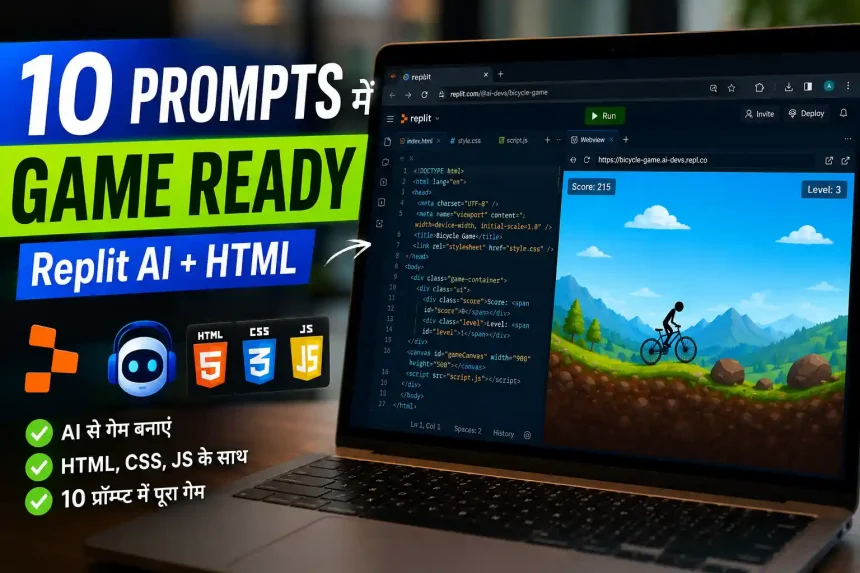
Replit AI से HTML bicycle game बनाना चाहते हो? ये रहे 10 exact prompts जो मैंने खुद try किए — copy करो, paste करो, और game ready है।
मेरे पास एक client का email आया जिसमें उसने केवल बोला की एक Cycle Game चाहिए जो HTML,CSS और JS language में बना हो, और इस Game को same day में client को डिलीवर भी करना था |
लेकिन जब हमने एक दूसरे client का Tractor Game जोकि same language में बना था उसको हमारे bug fix करने के लिए दिया था – जिसको हम ध्यान में रख कर इस Game को एक दिन में Replit AI से बनाएँगे |
पिछले Article में हमने Tractor game बनाते समय कुछ problem नोटिस की थी जिसमें से जब मैंने पहला prompt vague देने पर AI एक rectangle बनाता है और उसे “tractor” कहता है। उसी article को publish करने के बाद कई लोगों ने पूछा: “Bhai, cycle game kaise banayein? Exact prompts do.”
उससे पहले clear एक जरुरी basic problem को clear कर देता हूँ की “vague prompt” क्या होता है – जब हम एक साथ पूरा game एक साथ बनाने के लिए prompt देते है जैसे: Build Cycle Game Using HTML,CSS and JS”. इसको को vague prompt problem कहते है |
आगे बढ़ाते है अपने Cycle game की तरफ –
नीचे मैं बताने वाला हूँ की किस तरह से इस Game को Ai की help से 10 prompts से create कर पाया |
हाँ ! और मैं ये भी बताने वाला हूँ की AI से Game बनाते समय मुझे कहाँ-कहाँ और किस टाइप की errors देखने को मिली | और उसको कैसे resolve की –
10 prompts जो मैंने खुद Replit पर try किए — एक sequence में। बीच में 3 बार game ब्रेक हुआ ,
2 बार restart करना पड़ा,
एक बार cycle terrain के अंदर घुस गई और सिर्फ wheels दिखते थे। लेकिन उन्हीं mistakes से यह guide बनी — ताकि तुम्हें वही गलतियाँ न करनी पड़ें।
बस इन्हें copy-paste करो, और एक working HTML bicycle game तैयार हो जाएगा। जिसको offline भी खेल सकते हो |
एक बात ध्यान देना है की नीचे prompts एक specific order में दिए गए है उनका Order नहीं बदलना है क्यों? वो Prompt 10 के बाद बताऊंगा।
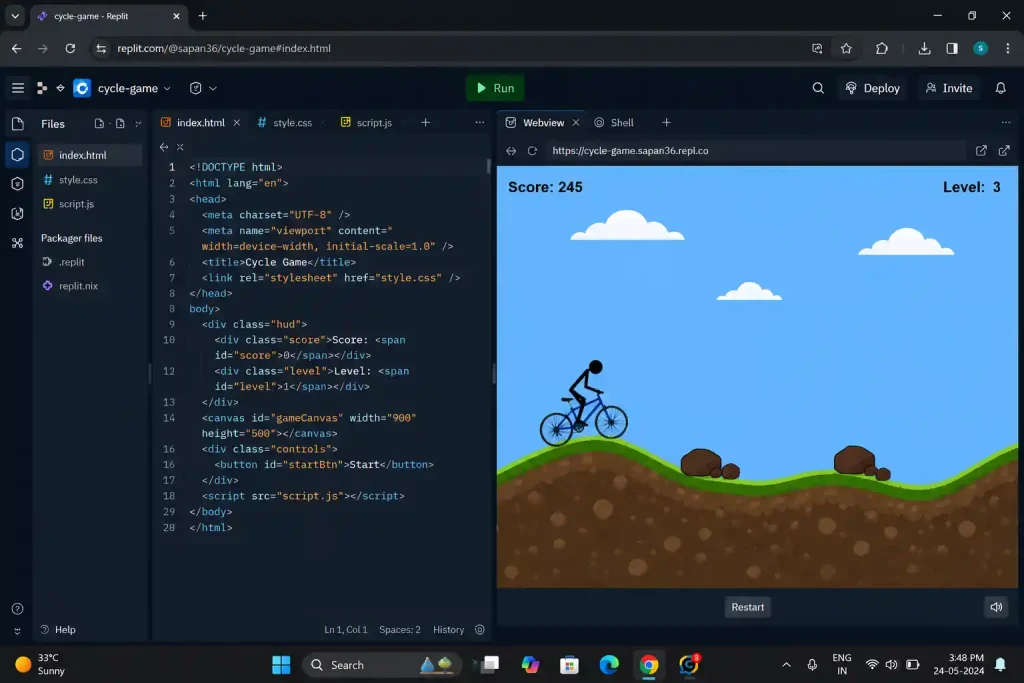
Game कैसा चाहिए (UI) — Expectation पहले Set करो
इससे पहले कि prompt 1 दो — एक बार imagine करो कि हम क्या बना रहे हैं: जैसा की नीचे मैंने set किया था client के लिए
· Side-scroll cycle game — bicycle left side पर रहती है, दुनिया दाईं तरफ scroll होती है
· हल्की-हल्की पहाड़ियाँ — flat ground नहीं, sine wave terrain
· पत्थर/rocks — randomly आते हैं, इनसे बचना है
· Space bar से jump — एक बार। Mid-air double jump नहीं।
· Distance score — जितना आगे गए, उतना score
· Speed बढ़ती जाए — Level 1 से Level 8 तक
· Game over screen — टकराने पर score दिखे + Restart button
· Mobile support — tap करके jump, phone पर भी चले
यही target है। शुरू करते हैं।
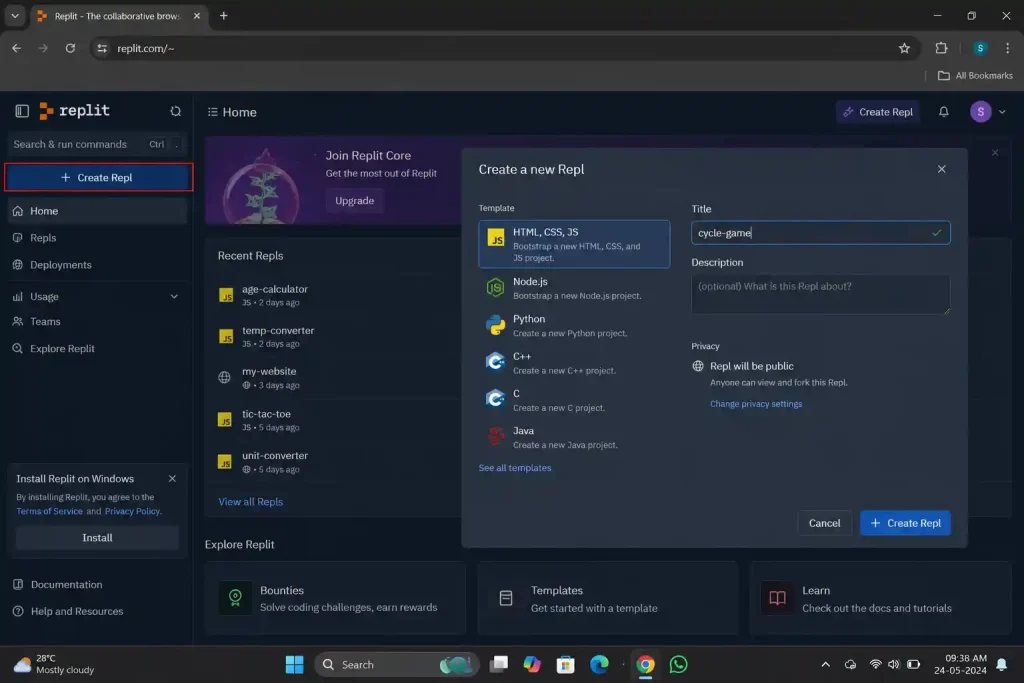
पहले Replit Setup — बस 2 मिनट का काम
1. replit.com पर visit करो
2. Account नहीं है तो बनाओ — free plan काफी है
3. Dashboard पर “+ Create Repl” button दबाओ
4. HTML, CSS, JS template select करो
5. Title दो: cycle-game
6. Create Repl — हो गया
बाईं तरफ index.html और बाकी फाइल्स भी दिखेंगी जब भी AI खुद से create करेगा । दाईं तरफ preview window। बीच में Replit AI का chat panel। वहीं से सारे prompts देने हैं।
Note: ध्यान देना है हर prompt के बाद Run button दबाओ और देखो कि उस step का output सही आ रहा है — तभी अगला prompt देना है । वरना यह rule तोड़ा तो बाद में bugs ढूंढना मुश्किल हो जाएगा |
Prompt 1 — Canvas और Cycle का Skeleton
यह prompt copy करो और Replit AI chat में paste करो:
Create a single HTML file with embedded CSS and JavaScript for a side-scrolling
bicycle game. Use an HTML5 canvas of 800×400 pixels. Draw a simple bicycle
(two circles for wheels, lines for the frame and handlebars) at x=100, y=320.
Add a flat green ground at y=350. Background should be light blue sky.
Do not add any movement or physics yet.
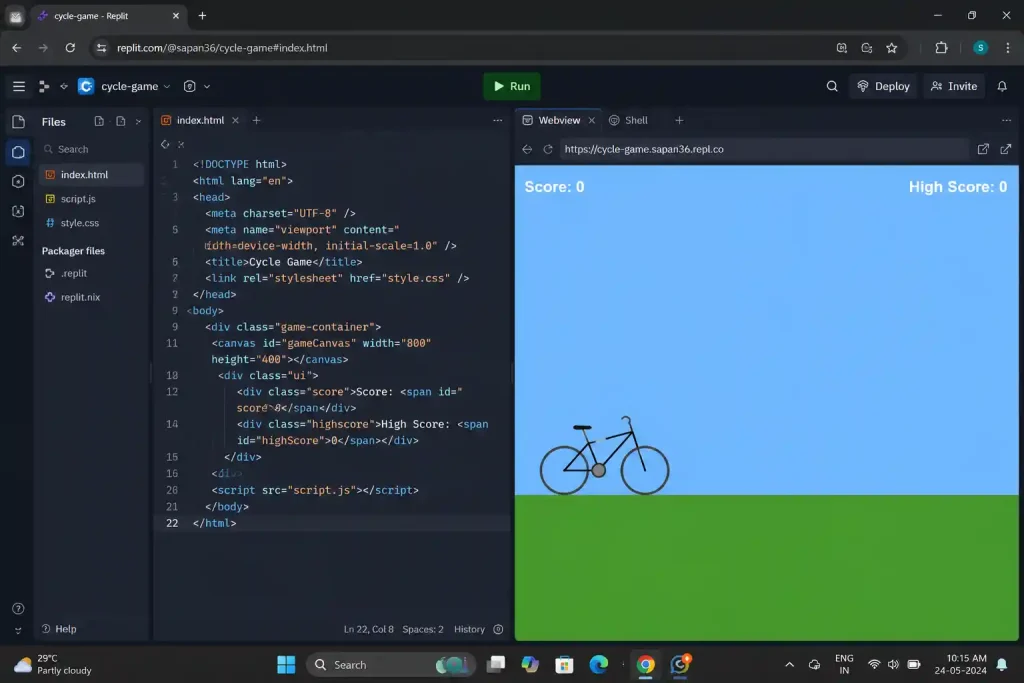
अगर पहली बार <canvas> use कर रहे हो तो MDN Canvas Tutorial देख सकते हो।
यह prompt क्या करता है:
सबसे पहले सिर्फ visual बनाना है — कोई physics नहीं, कोई movement नहीं। अब हम AI को केवल Design बनाने को बोल रहे है जिससे AI अपने से कुछ भी skip ना कर पाए जोकि Tractor article में यही Mistake 2 थी।
Expected Output:
Run करने पर — blue background, नीचे green strip (ground), उस पर एक recognizable bicycle। दो circles (wheels) और lines (frame)। Cycle हिलेगी नहीं।
अगर Laptop screen पर कुछ नहीं दिख रहा हो तब :
Chrome में F12 दबाओ → Console tab → कोई red error है?
· canvas is null → HTML में <canvas id=”gameCanvas”> है या नहीं check करो
· Error नहीं लेकिन कुछ नहीं दिख रहा → AI से पूछो: “Canvas is rendering but nothing is visible. Add a console.log to confirm draw functions are being called.”
Ai खुद से bug find करके ठीक कर देगा | अगर कोई कंसोल में error show होती, तब आपको केवल error को कॉपी-पेस्ट करके ai को दे देना है जिससे AI exact issue को fix कर सके |
Prompt 2 — Cycle का Visual Upgrade
The bicycle currently looks too basic. Improve the bicycle drawing:
– Front and rear wheels: filled dark circles with a lighter grey inner circle (tire look)
– Frame: draw a proper diamond frame shape with handlebar and seat
– Add a simple stick figure rider sitting on the seat
Keep everything static, no movement yet.
यह prompt क्यों दिया:
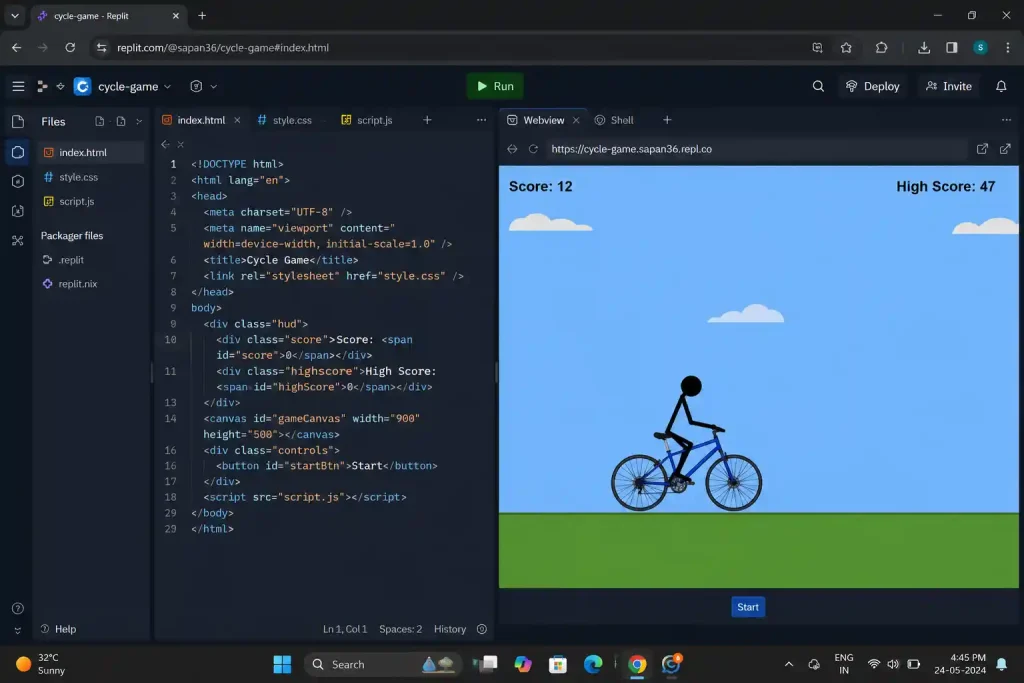
Game में user सबसे पहले visual ही notice करता है। अगर cycle सिर्फ एक rectangle या basic shape जैसी दिखेगी तो खेलने का मज़ा नहीं आएगा। इसलिए पहले उसका design थोड़ा सही बनाना ज़रूरी है। और एक फायदा ये भी रहता है कि जब visual सही बन जाता है, तब आगे physics add करते समय cycle की position और center point समझना आसान हो जाता है।
Prompt 2 के Output से अब cycle real लगेगी जिसमें proper wheels, diamond frame, और rider। अभी भी static।
अगर Wheels frame से disconnect हो गई हों तो तब Follow Up में नीचे दी गई prompt use करो :
The wheels are not aligned with the frame.
The rear wheel center should be at (cycleX + 20, cycleY)
and front wheel at (cycleX + 70, cycleY). Fix the alignment.
Prompt 3 — Game में Gravity और Jump Add करना
Add physics to the bicycle:
– The bicycle should stay on the ground by default
– When the player presses Space or Up Arrow, the bicycle jumps
– Apply gravity so the bicycle comes back down naturally
– The bicycle should NOT be able to jump again while in the air (no double jump)
– Use these exact values: gravity = 0.6, jumpForce = -13, groundY = 320
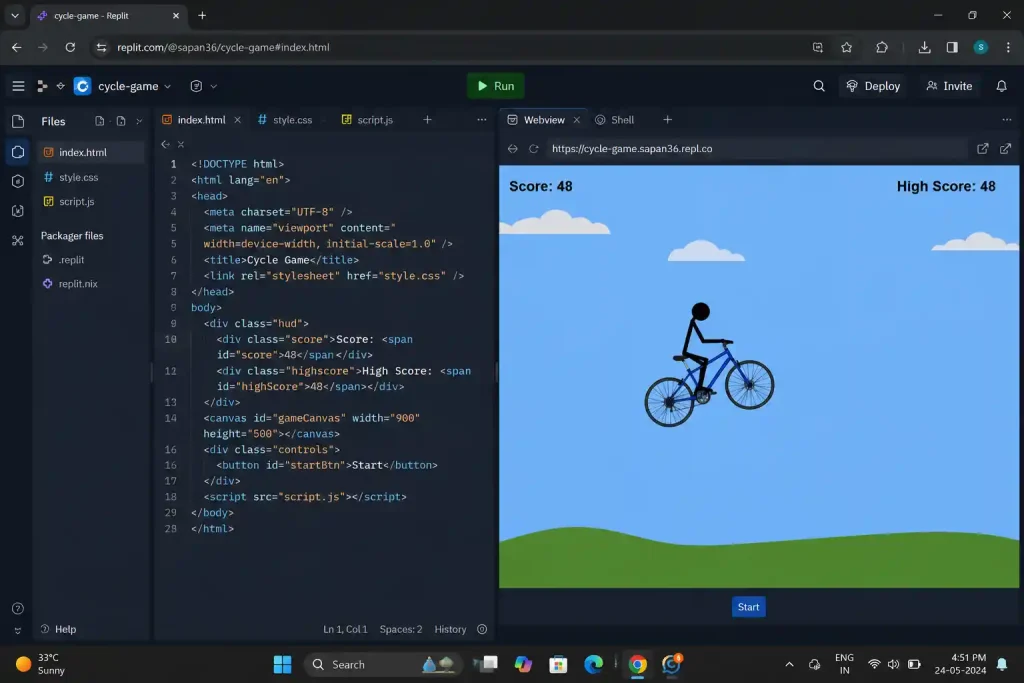
यह prompt क्यों दिया:
Physics में values सही देना बहुत ज़रूरी है। मैंने जब पहली बार बिना values बताए prompt दिया था तो AI ने gravity बहुत कम रख दी जिससे game में cycle इतनी धीरे नीचे आ रही थी कि jump real लग ही नहीं रहा था।
फिर जब AI को problem बताई तब उसने gravity ज़्यादा कर दी और cycle इतनी तेज नीचे गिर रही थी जैसे पत्थर गिरता है। Cycle jump का smooth curve पूरा खराब हो गया था।
Output में ये होना चाहिए था –
जब Space बटन दबाने पर cycle एक smooth arc में ऊपर जाती है और वापस ground पर आती है। Mid-air में Space बटन दबाने पर कुछ नहीं होता।
Bug 1 — Infinite Jump (mid-air में भी jump होता है):
यह isOnGround flag set न होने से होता है।
The cycle can jump again while in the air.
Add a boolean variable ‘isOnGround’.
Set it to true only when cycle’s Y position equals groundY.
Only allow jumping when isOnGround is true.
Bug 2 — Cycle ground के नीचे चली जाती है–
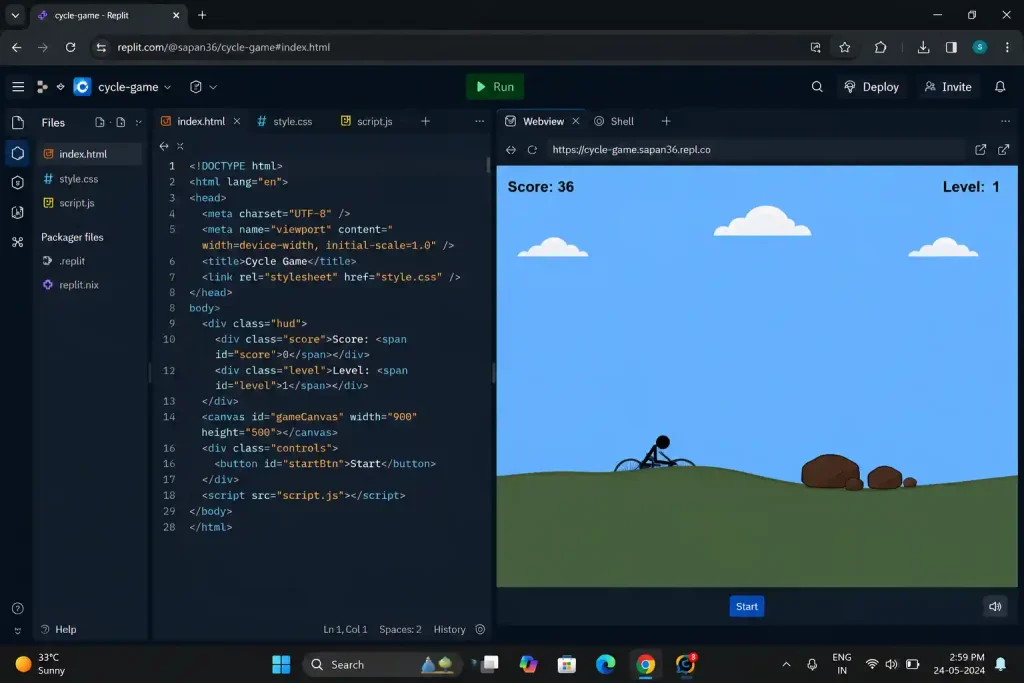
जब मैंने पहली बार यह prompt दिया तो cycle ground के नीचे घुस गई थी जिससे screen पर सिर्फ wheels का ऊपरी हिस्सा दिखता था। clamp logic missing था।
मतलब Cycle को game की design के साथ screen पर देखने से ऐसा नहीं लगता था की वो रोड पर खड़ी है | सड़क की canva design की पीछे छिपने की वजह से होता है जिसको नीचे दिए गए values को देकर problem fix कर सकते हो –
The cycle goes below the ground level.
After updating Y position, add:
if (cycleY >= groundY) { cycleY = groundY; velocityY = 0; isOnGround = true; }
यह एक line fix है — cycle को groundY से नीचे जाने से रोकती है।
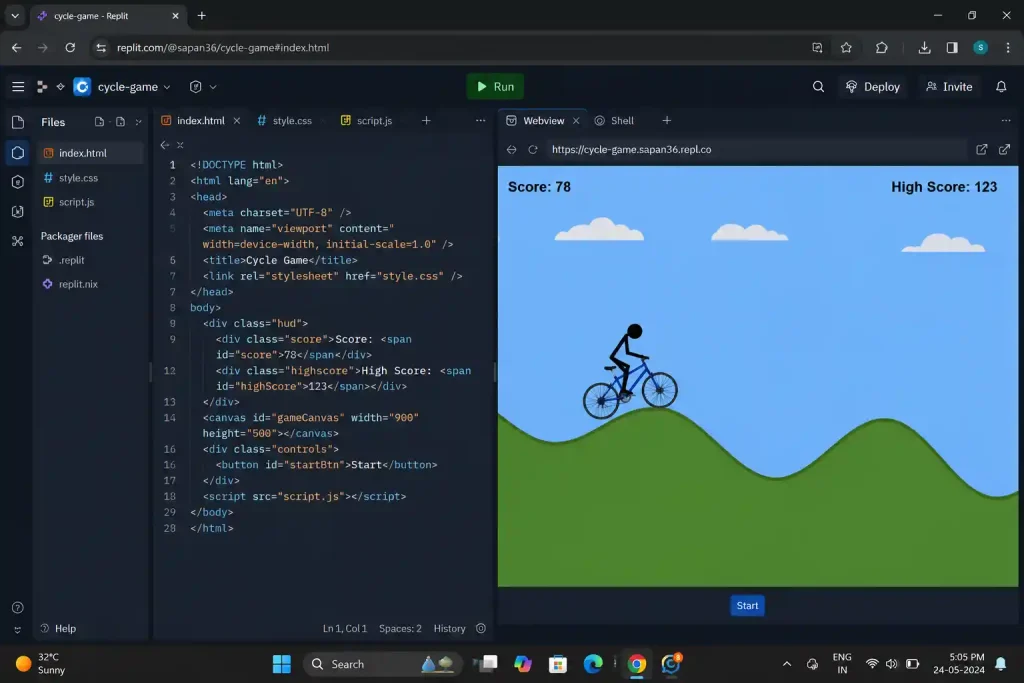
Prompt 4 — पहाड़ी Terrain
Replace the flat ground with hilly terrain:
– Generate terrain using a sine wave: terrainY = 320 + Math.sin(x * 0.02) * 40
– Draw the terrain as a filled green polygon from left to right edge of canvas
– The bicycle should always stay on top of the terrain surface
– Create a function getTerrainY(x) that returns the terrain height at any X position
– Scroll the terrain to the left as the game runs (terrain moves, bicycle stays at x=100)
अब यह prompt क्यों दिया:
Cycle game flat ground पर चल तो जाती है, लेकिन देखने में उतना मज़ा नहीं आता। Terrain add होने के बाद game थोड़ा real और interesting लगने लगता है क्योंकि cycle ऊपर-नीचे ride करती दिखती है। लेकिन पूरा game बनाते समय यही step सबसे ज़्यादा tricky भी था, इसलिए इसके लिए अलग से prompt दिया है।
Expected Output:
Output में green ground ऊपर-नीचे wave shape में दिखेगी। Cycle उसी surface के ऊपर ride करती हुई चलेगी और पीछे का background scroll होता दिखेगा, जिससे game पहले से ज़्यादा real लगेगा।
मेरा Personal Note — यह step मुझे 2 बार redo करना पड़ा–
पहली बार cycle terrain के ऊपर हवा में float कर रही थी — getTerrainY() function था ही नहीं, AI ने सिर्फ visual terrain बनाया था। अगर canvas drawing और shapes को detail में समझना है तो MDN Drawing Shapes with Canvas से और भी जानकारी ले सकते है |
दूसरी बार cycle terrain के अंदर घुस गई।
तीसरी बार नीचे दिए fixes apply करने के बाद सही हुआ।
अगर आपको भी same issue आए तब नीचे दिए गए solution को copy-paste करो जो AI खुद से समझ कर ठीक कर देगा-
Problem 1 — Cycle terrain के ऊपर float करती है
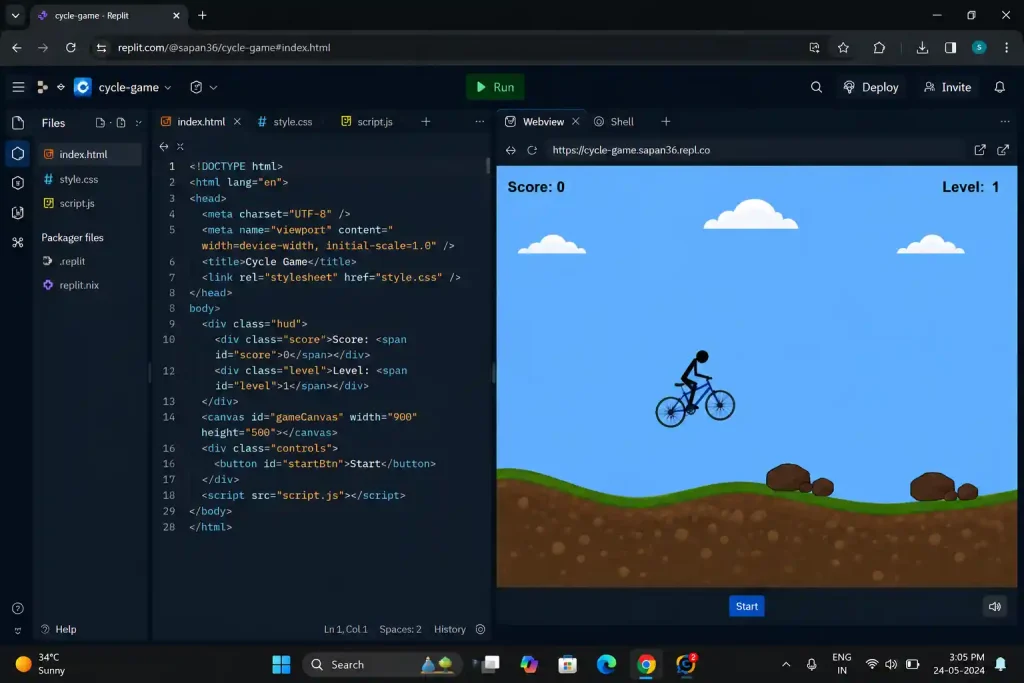
The cycle is floating above the terrain.
The cycle’s Y position should always equal getTerrainY(cycleX) minus
the cycle’s wheel radius (20px). Update this every frame in the game loop.
Problem 2 — Cycle terrain के अंदर घुस जाती है:
Same fix — cycleY को हर frame में getTerrainY(cycleX) – wheelRadius से clamp करो।
Problem 3 — Terrain scroll होता है लेकिन jump broken हो गई:
Jump is broken after terrain was added.
The jump should work as an offset from the terrain surface, not from a fixed groundY.
When cycle is on ground, its base Y = getTerrainY(cycleX).
Jump should go above this value.
एक बात: Sine wave terrain सबसे आसान approach है शुरुआत में। Procedural random terrain बाद में try करना — पहले यह stable करो।
Prompt 5 — Obstacles (पत्थर)
Add obstacles to the game:
– Obstacles are brown rocks (draw as irregular polygon or rectangle)
– Rocks spawn from the right edge of the canvas every 2-3 seconds (random interval)
– Rocks move left at the same speed as the terrain scroll
– Rocks should appear ON the terrain surface, not floating in air
– Store obstacles in an array, remove them when they go off-screen left
यह prompt क्यों दिया:
Compressed version, तुम्हारे ही tone में:
Obstacles के बिना game अधूरा लगता है क्योंकि cycle बस आगे चलती रहगी और player कभी out होगा ही नहीं | इसलिए rocks add करना ज़रूरी है। Prompt में terrain surface par spawn लिखना भी जरूरी है, नहीं तो AI कई बार rocks हवा में बना देता है।
Expected Output:
Screen के दाईं तरफ से brown rocks आएँगे, सड़क पर रखे हुए दिखेंगे, और game play में screen की left की तरफ जाएँगे।
जब Rocks हवा में float कर रहे हो तब AI को ये कमांड दो-
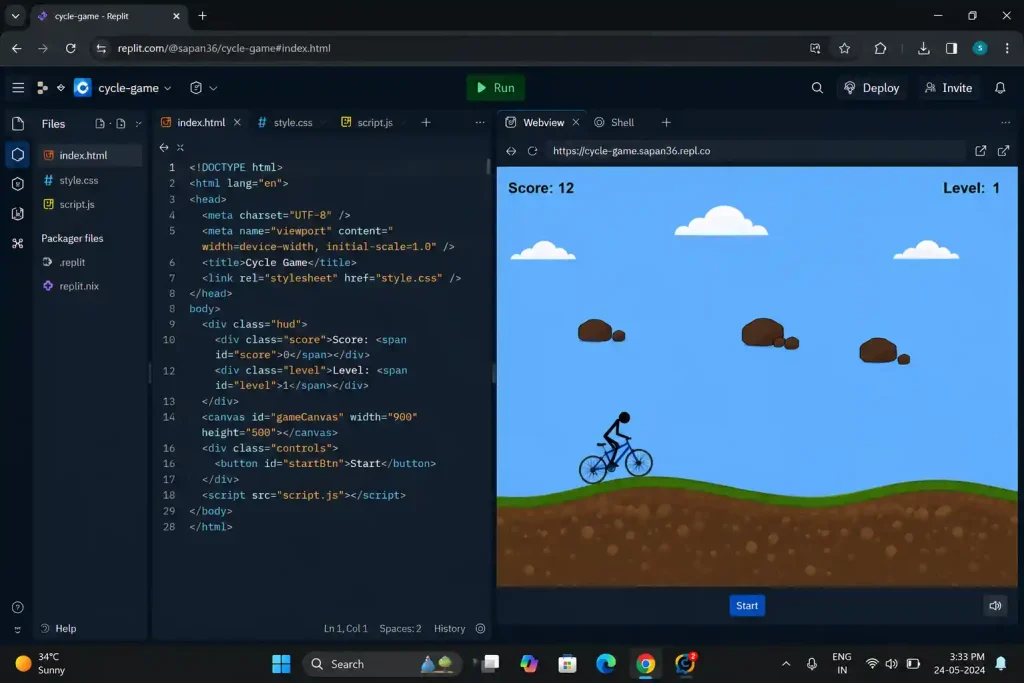
Rocks are spawning in the air instead of on the ground.
When spawning a rock, set its Y position to:
getTerrainY(canvas.width) – rockHeight
जब बहुत ज़्यादा rocks एक साथ हो तब –
Rocks are spawning too frequently.
Set minimum spawn interval to 1500ms and maximum to 3000ms.
Prompt 6 — Collision Detection
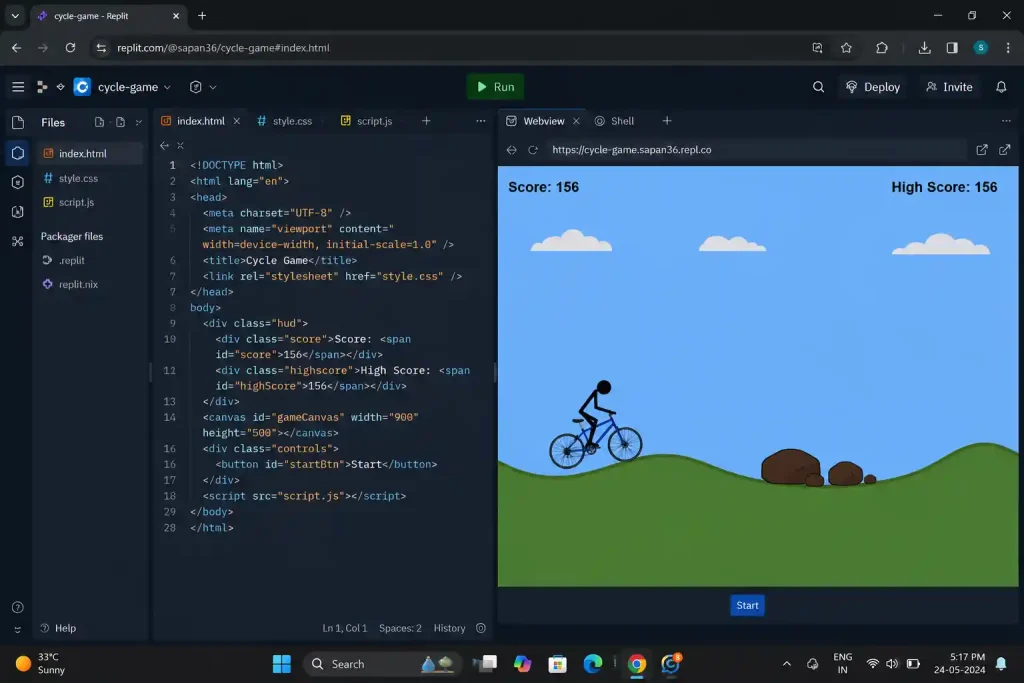
Add collision detection between the bicycle and rocks:
– When the bicycle hits a rock, set gameOver = true and stop the game loop
– Use AABB collision (rectangle overlap check)
– Make the bicycle’s hitbox slightly smaller than its visual size for fairness:
hitbox width = 60px, hitbox height = 40px, centered on the bicycle
– When collision is detected, briefly flash the screen red before stopping
यह prompt क्यों दिया:
Collision detection में यहाँ दो चीज़ों का ध्यान रखा है — पहला AABB method use किया है जिससे cycle और rock का overlap आसानी से detect हो जाए, और दूसरा hitbox को visual से थोड़ा छोटा रखा है ताकि game खेलते समय collision unfair ना लगे।
Hitbox छोटा क्यों:
Hitbox छोटा इसलिए रखा है क्योंकि अगर उसका size cycle के visual जितना होगा तो हल्का सा touch होने पर भी game over हो जाएगा। थोड़ा छोटा hitbox रखने से game खेलते समय better feel आता है और player को थोड़ा control का chance भी मिलता है।
Expected Output:
Cycle rock से टकराए → screen red flash → game stop।
नीचे दिए गए small changes prompts के साथ Replit AI problem clear समझा सकते हो-
जब cycle और पत्थर के बीच Collision बहुत जल्दी triger हो रही हो तब
Collision is triggering too early.
Print hitbox coordinates to console:
console.log(‘cycle:’, cycleX, cycleY, ‘rock:’, rock.x, rock.y)
Check if hitbox positions are calculated correctly.
जब Collision हो ही नहीं रही हो
Collision detection is not working.
The AABB check should be:
if (cycleX + 10 < rock.x + rock.width &&
cycleX + 70 > rock.x &&
cycleY – 40 < rock.y + rock.height &&
cycleY > rock.y) { gameOver = true; }
Prompt 7 — Score Counter
Add a score system:
– Score represents distance traveled (increases every frame the game is running)
– Display score in top-left corner: white text, font size 20px, “Score: 0”
– Score increases by 1 every frame
– When game is over, stop incrementing score
– Store the score in a variable named ‘score’, initialize it to 0
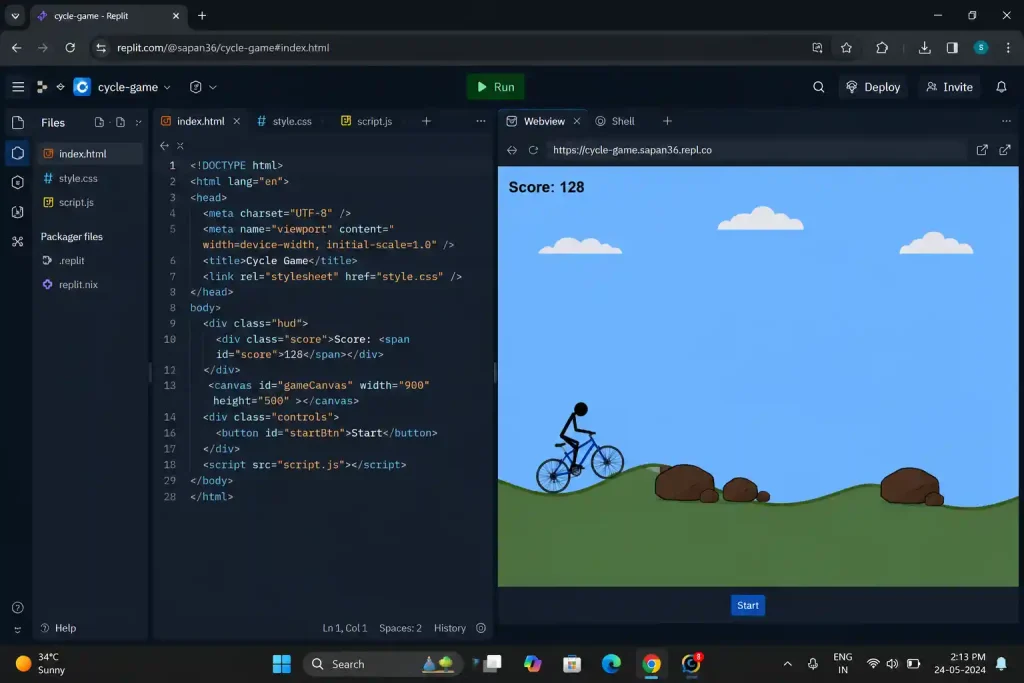
यह prompt क्यों दिया:
Game में Score ना हो तब player अपनी performance ट्रैक ही नहीं कर पाएगा, लेकिन NaN (Not a Number) bug सबसे ज़्यादा यहीं आता है क्योंकि कई बार variable initialize नहीं होता। इसलिए prompt में score = 0 पहले से mention किया है।
Screen पर Expected Output:
Top-left में “Score: 0” से शुरू होकर हर frame बढ़ता रहेगा। Rock से टकराने पर counter रुक जाएगा।
अगर Score “NaN” दिख रहा है:
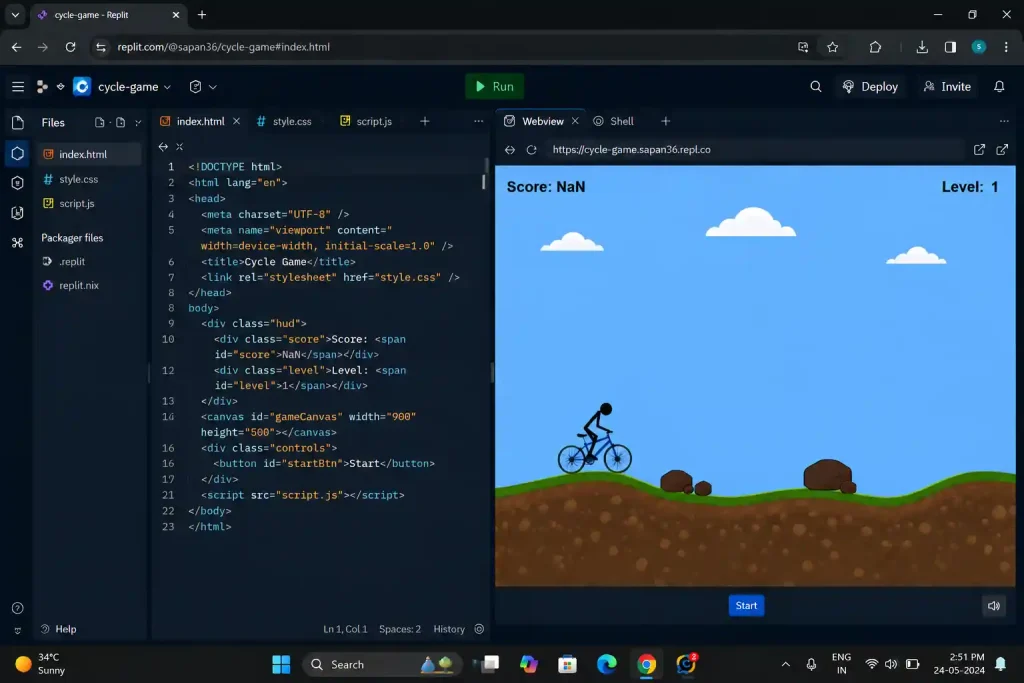
Score is showing NaN.
Make sure score is initialized as: let score = 0;
Also check that score++ is inside the game loop, not outside it.
Score game over के बाद भी बढ़ता है:
Wrap score++ inside: if (!gameOver) { score++; }
Prompt 8 — Speed बढ़ती जाए
Add progressive difficulty:
– Create a variable ‘gameSpeed’ starting at 3
– Every 600 frames (approximately 10 seconds), increase gameSpeed by 0.5
– Maximum gameSpeed should be capped at 12
– Use gameSpeed to control terrain scroll speed and obstacle movement speed
– Display current speed level in top-right: “Level: 1”, “Level: 2” etc.
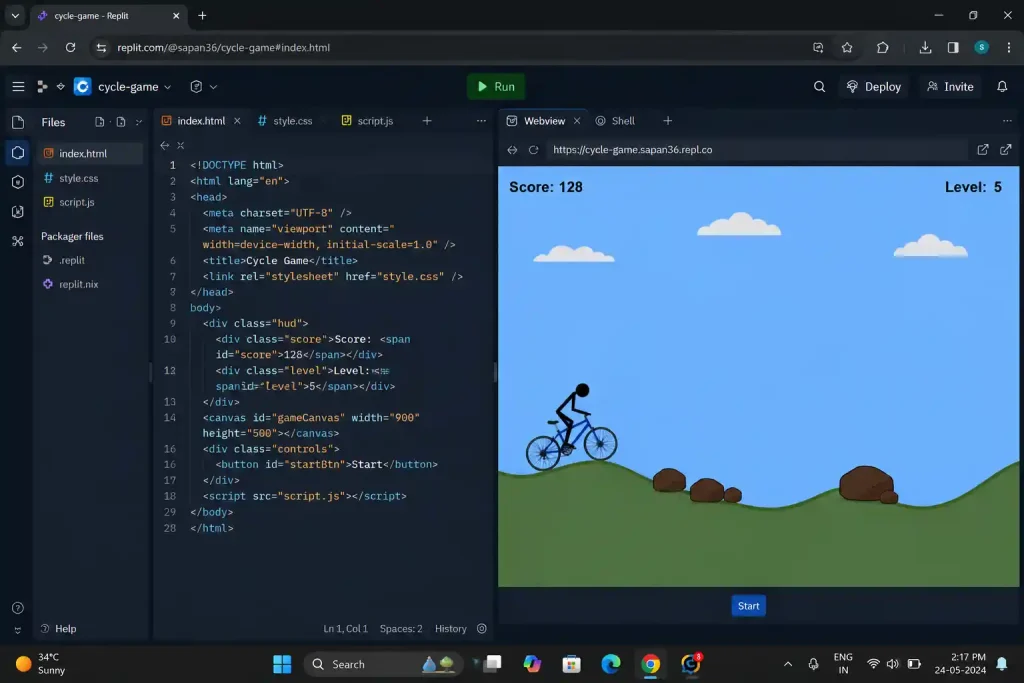
यह prompt क्यों दिया:
तुम्हारे tone में इसे ऐसे लिखा जा सकता है:
Game में speed धीरे-धीरे बढ़ना ज़रूरी है, नहीं तो कुछ देर बाद खेलना boring लगने लगता है। यहाँ gameSpeed एक ही variable है जो terrain और rocks दोनों को control करता है। साथ में इसकी maximum limit रखना भी जरूरी है, नहीं तो आगे जाकर rocks इतने तेज आने लगते हैं कि game खेलना मुश्किल हो जाता है।
Expected Output:
बिल्कुल—number और context वही रखते हुए, तुम्हारे style में:
शुरुआत में game slow रहेगा। 10 seconds बाद थोड़ा fast होने लगेगा। Top-right में Level counter भी दिखेगा जिससे current level पता चलता रहेगा। Level 8-9 तक पहुँचते-पहुँचते game genuinely challenging लगने लगता है।
जब Speed बढ़ने पर terrain और rocks mismatch करते हैं:
When speed increases, terrain scrolls faster but rocks still move at old speed.
Both terrain scroll and obstacle movement should use the same ‘gameSpeed’ variable.
Replace all hardcoded speed values with gameSpeed.
Prompt 9 — Game Over Screen और Restart
Add a game over screen:
– When gameOver is true, draw a semi-transparent dark overlay over the canvas
– Show “Game Over” in large white text (40px) in the center
– Show “Score: [final score]” below it (25px)
– Add a “Play Again” button (styled rectangle with text)
– Clicking “Play Again” should reset: score=0, gameSpeed=3, obstacles=[],
cycleY=groundY, gameOver=false, and restart the game loop
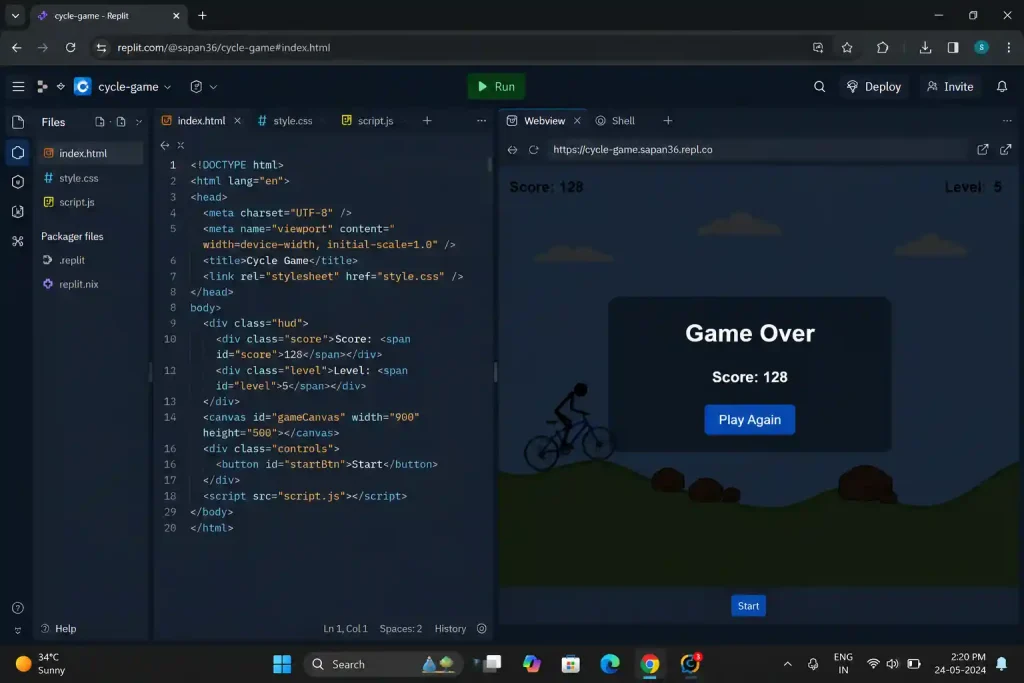
यह prompt क्यों दिया:
Reset सबसे ज़्यादा bug prone होता है। Exactly बताया कि reset में क्या-क्या reset होना चाहिए।
Personal Note — “Play Again” button ने 20 minute लिए:
जब मैंने पहली बार यह prompt दिया, game over screen तो आई लेकिन “Play Again” click ही नहीं हो रहा था। काफी देर तक समझ नहीं आया। फिर पता चला — canvas click event में button के coordinates check ही नहीं थे।
नीचे exact prompt दिया है जिससे इस problem को fix किया था –
Expected Output:
Game का flow यासा होना चाहिए –
Cycle टकराए → dark overlay → “Game Over” → Score → “Play Again”। Button click करने पर fresh start।
“Play Again” button is not clickable.
Add a click event listener on the canvas.
When clicked, check if click coordinates fall within button rectangle:
if (e.clientX > btnX && e.clientX < btnX+btnW &&
e.clientY > btnY && e.clientY < btnY+btnH) { resetGame(); }
Restart के बाद पुरानी rocks दिखती हैं:
After restart, old rocks are still visible.
In resetGame() function, add: obstacles = [];
Prompt 10 — Mobile Touch Controls
Add mobile support:
– On touchstart anywhere on the screen, trigger a jump (same as Space key)
– Add preventDefault() on touchstart to prevent page scrolling while playing
– Add a small hint text at bottom of canvas: “Tap to jump” — visible only on mobile
– Use CSS media query: on screens smaller than 768px, canvas should scale to fit screen width
यह prompt क्यों दिया:
India में ज़्यादातर users mobile पर game खेलते हैं। इसलिए preventDefault() यहाँ specifically mention किया है। अगर इसे add नहीं करोगे तो tap करते समय page scroll होने लगता है और game के बीच में screen ऊपर-नीचे move होने लगती है। जिससे player का gaming एक्स्पेरिंस ख़राब होता है |
Expected Output:
तुम्हारे style में, context वही रखते हुए:
Output में phone पर game सही से खुलेगा और screen के हिसाब से fit हो जाएगा। Tap करने पर cycle jump करेगी, और नीचे "Tap to jump" का hint भी दिखेगा जिससे user को control तुरंत समझ आ जाए।
Tap से double jump:
Single tap is triggering two jumps.
Add a flag: let touchHandled = false;
Set it true on touchstart, false on touchend.
Only trigger jump if touchHandled is false.
Canvas phone पर बहुत छोटा:
Add this CSS:
canvas { max-width: 100%; height: auto; display: block; margin: 0 auto; }
Also add in HTML head:
<meta name=”viewport” content=”width=device-width, initial-scale=1.0″>
जैसा की मैंने Game की शुरुआत में बोला था Prompt Sequence का Order Matter क्यों करता है
इस section skip मत करना क्योंकि game बनाते समय और भी बातों का ध्यान देना होगा वरना prompt का output डिफरेंट मिलेगा –
10 prompts एक dependency chain हैं।
Prompt 6 (collision) काम करेगा तभी जब Prompt 5 (obstacles) हो — बिना obstacles के collision किससे होगी?
Prompt 5 (rocks) ठीक से spawn होंगे तभी जब Prompt 4 (terrain) stable हो — rocks को terrain Y position चाहिए।
Prompt 4 (terrain) सही रहेगा तभी जब Prompt 3 (jump) पहले stable हो — terrain add होने के बाद jump को terrain coordinates के साथ coordinate करना पड़ता है।
अगर order बदला — मान लो पहले obstacles, फिर terrain — AI एक ऐसा system बनाएगा जहाँ obstacles flat ground पर हों और terrain add होने पर वो हवा में float करने लगेंगे।
जैसे पहले नींव, फिर दीवारें — पहले छत नहीं बनाते।
यही reason था Tractor article की Mistake 2 में सब कुछ एक साथ AI से बनवाना। इस article के 10 prompts उसी mistake का structured solution हैं।
Normal Problem with Quick Solution
| Problem | असली वजह | Instant Fix |
| Screen पूरी खाली है | Canvas initialize नहीं हुई | console.log(document.getElementById(‘gameCanvas’)) — null आए तो HTML में canvas tag missing |
| Cycle ground के नीचे जाती है | groundY clamp missing | if (cycleY > groundY) { cycleY = groundY; velocityY = 0; } |
| Rocks हवा में float करते हैं | Spawn Y में getTerrainY() नहीं | rock.y = getTerrainY(canvas.width) – rockHeight |
| Score NaN दिखता है | Variable declare किया, initialize नहीं | let score = 0; — value assign ज़रूरी है |
| “Play Again” click नहीं होता | Canvas click event में bounds check missing | Button rectangle coordinates click event में verify करो |
| Phone पर tap से page scroll | preventDefault() नहीं | touchstart event में e.preventDefault() पहली line में |
| Speed बढ़ने पर rocks mismatch | दोनों अलग speed variable | एक gameSpeed variable से दोनों control करो |
| Restart पर पुरानी rocks | obstacles = [] reset में missing | resetGame() में obstacles = []; ज़रूर लिखो |
Transparency Note
यह game मैंने Replit AI के साथ actually build करके देखा है। Terrain + jump का combination (Prompt 3 + 4) सबसे ज़्यादा trouble देता है — getTerrainY() function वहाँ genuinely tricky है। Prompt 4 के बाद cycle terrain पर properly नहीं ride करे — घबराओ नहीं, यह सबसे common stuck point है, और ऊपर दिए fixes से solve होता है।
यह article किसी tool के साथ sponsored नहीं है। Replit एक third-party platform है, features और pricing बदल सकते हैं।
FAQ
Q1. क्या Replit free plan पर यह game बन जाएगा?
हाँ, basic plan में यह game बन जाता है। AI chat की free limit है — अगर prompts ज़्यादा हों तो daily limit hit हो सकती है। उस case में अगले दिन continue करो। Latest pricing के लिए replit.com/pricing check करो।
Q2. HTML/JavaScript बिल्कुल नहीं आती — फिर भी बनेगा?
बनेगा, लेकिन errors आने पर AI को exact context देना होगा जिसके लिए तुम error message copy करके दो: “यह error आ रही है, cycle game बना रहा हूँ, क्या हो रहा है?” Coding नहीं आती तो इस article की “आम दिक्कतें” table use करो।
Q3. Game बन गया, share कैसे करें?
Replit में top-right पर Deploy button है। Free hosting मिलती है — एक link generate होता है जो दोस्तों को share कर सकते हो। Mobile पर भी वो link खुलेगा।
Q4. Terrain और भी interesting कैसे बनाएँ?
Sine wave stable हो जाए तो यह extra prompt try करो: “Replace sine wave terrain with random terrain — generate terrain points array at start using Math.random() with smoothing, and reuse them for consistent scrolling.”
Q5. Rocks की जगह कोई और obstacle add कर सकते हैं?
हाँ। Game stable होने के बाद: “Add a second obstacle type: a low-hanging branch at y=220 that the cycle must duck under using Down arrow key. Cycle crouches to y=350 to pass.” यह game को काफी ज़्यादा interesting बना देगा।