
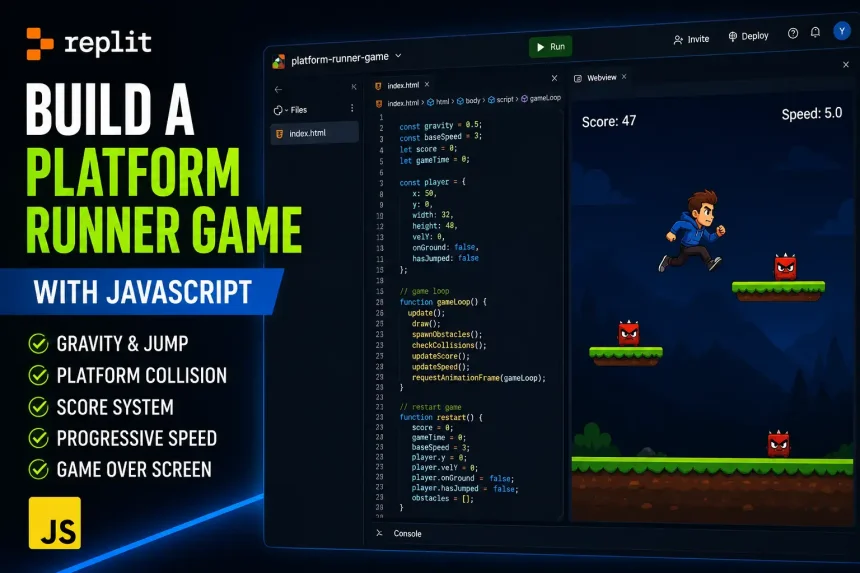
सोचा था ! Replit AI से एक platform runner game बनाता हूँ जिसमें मुझे 1 घंटे का काम करने में 4 घंटे लग गए। Game बनाते समय सबसे ज्यादा issue Gravity bug, double jump की दिक्कत थी, और वहीँ दूसरी तरफ obstacles screen से बाहर जा रहे थे |
इस article में, मैं अपनी Real journey, real prompts, और real fixes के बारे में बात करते है |
मैं platform runner game को Mario गेम जैसा बनाना चाहता था जिसमें character jump कर सके , obstacles से बचे और survive करे |
Game बनाते समय लगा की “1 घंटे का काम है।” — मैंने खुद से कहा था।
जिसमें देखते ही देखते 4 घंटे लगे।
पहले तो Gravity bug ने game को बिगाड़ा। फिर Double Jump bug ने gameplay खराब कर दिया। उसके बाद obstacles canvas के बाहर जाने लगे, और restart करने पर speed भी reset नहीं हो रही थी। जितनी बार भी bugs को fix करता तभी कोई दूसरा bug create हो जाता |
पहले Gravity bug आया, फिर Double Jump bug ने। उसके बाद obstacles canvas के बाहर जाने लगे और restart करने पर पुरानी gameplay speed reset होने के बजाय वैसे की ही बनी रहती थी। जिससे हर fix के साथ एक नई समस्या सामने आ रही थी।
अगर आप कोई shortcut guide ढूँढ रहे हैं, तो यह वैसा article नहीं है। यहाँ मैं वही शेयर कर रहा हूँ जो वास्तव में हुआ—कौन से bugs आए, उनका root cause क्या निकला, और Replit AI से उन्हें fix करवाने के लिए मुझे क्या-क्या कहना पड़ा।
Platform Runner Game बनाना बाकी Games से अलग क्यों है
जब हमने Snake game बनाया था तो उसमें एक array move करती थी। और Cycle game में एक single object terrain पर चलता था।
Platform runner में एक physics engine चाहिए।
फर्क यह है — Snake और Cycle में player की position directly control होती थी। Arrow key दबाओ, position update होती है |
Platform runner में player की position velocity से control होती है। और velocity पर gravity लगातार काम करती है।
Game में हर frame पर यही होता है:
velocity_y = velocity_y + gravity // gravity हर frame नीचे खींचती है
player_y = player_y + velocity_y // position velocity से update होती है
Jump एक धक्का है ऊपर की तरफ — gravity फिर नीचे खींचती है। बिल्कुल वैसे जैसे एक ball को ऊपर फेंकते हो — वो ऊपर जाती है, रुकती है, फिर नीचे आती है।
यही वजह है कि platform runner का पहला prompt ही अलग type का होना चाहिए जिसमें physics parameters पहले define करने पड़ते हैं, तब बाकी सब।
Game का Plan — Exact Numbers पहले Decide किए
मैंने यह values पहले test करके decide की, तब Replit AI को exact numbers दिए।
अगर vague prompt देता — “add gravity and jump” — तो AI अपनी मर्ज़ी से values set करता। बाद में change करना मुश्किल होता। Physics values एक-दूसरे से connected होती हैं — gravity बदलो तो jump strength भी adjust करनी पड़ती है।
Gravity : 0.5 per frame
(0.3 = character floating लगता है
0.8 = brick की तरह गिरता है — fun नहीं)
Jump Strength : 12 (negative velocity — ऊपर)
(8 = बहुत छोटा jump, platforms तक नहीं पहुँचा
15 = ceiling से टकराया)
Character: 40×50px rectangle
(sprite बाद में add करेंगे)
Ground: Canvas के bottom से 60px ऊपर
Platforms: 3–4 floating platforms, अलग-अलग heights पर
Obstacles: Left से right move करते हुए rectangles
Score: जितनी देर survive करोगे, उतना score बढ़ेगा (हर second +1)
Speed: हर 10 seconds बाद obstacles की speed थोड़ी बढ़ेगी
इन्हीं values को final करने के बाद मैंने Replit खोला और पहला prompt दिया।
पहला Attempt — Character Floor से नीचे चला गया
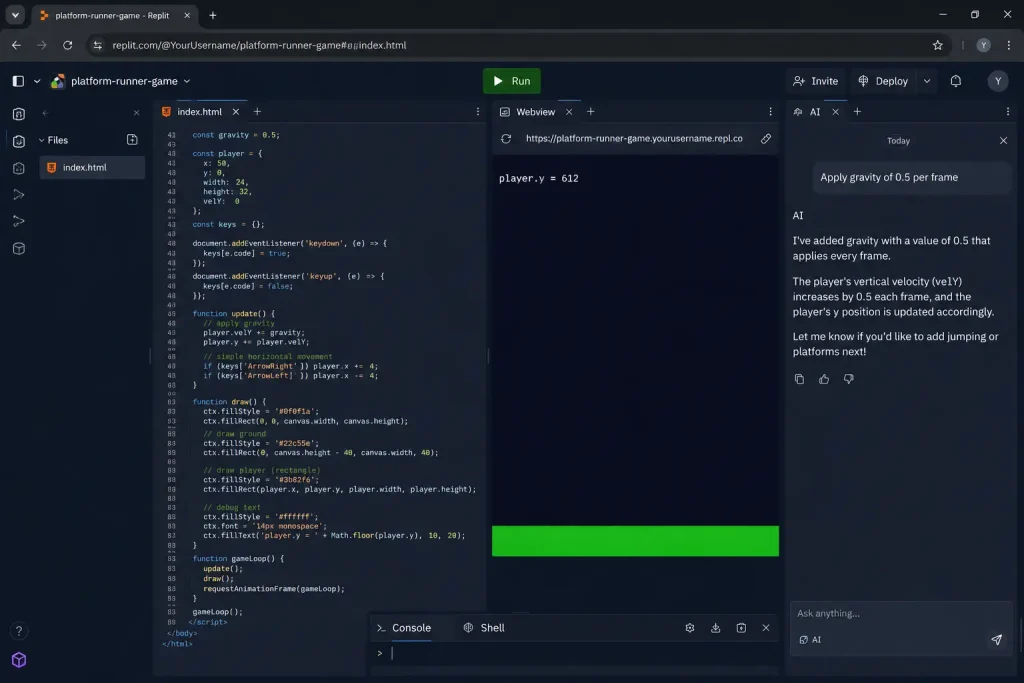
यह मेरा पहला prompt था:
Create a single HTML file with embedded CSS and JavaScript for a platform runner game.
Canvas size: 600×400 pixels. Dark background (#0f0f1a).
Add a player rectangle (40×50px, blue #4488ff) at position x:80, y:300.
Apply gravity of 0.5 per frame — player falls down each frame.
Add a ground platform at y:340, full canvas width, height 60px, color #2d5a27.
Player must stop when it lands on ground — no falling through.
Use requestAnimationFrame for the game loop.
All code in one HTML file.
Output में background, ground और character तीनों दिखाई दिए। लेकिन जैसे ही game start हुआ, character नीचे गिरकर ground के अंदर चला गया। कुछ seconds बाद canvas पर सिर्फ background और ground ही दिख रहे थे।
पहली नज़र में लगा कि character render ही नहीं हो रहा। लेकिन actual problem कुछ और थी। Gravity तो सही काम कर रही थी, लेकिन ground collision का logic add नहीं हुआ था। Character ground तक पहुँचने के बाद रुकने की जगह उसके अंदर जाता रहा और आखिर में screen के बाहर निकल गया।
Fix prompt:
The player is falling through the ground.
Add ground collision detection:
– Each frame, after applying gravity and updating player.y
– Check if (player.y + player.height) >= ground.y
– If yes: set player.y = ground.y – player.height
– Set player.velY = 0
– Set player.onGround = true
Gravity सही काम कर रही थी, लेकिन character को यह पता ही नहीं था कि ground कहाँ खत्म होती है। इसलिए उसे रोकने के लिए यह prompt दिया।
Ground collision का core logic कुछ ऐसा था:
// Ground collision — हर frame के end में check करो
function checkGroundCollision() {
  const groundY = canvas.height - 60;

  if (player.y + player.height >= groundY) {
    player.y = groundY - player.height;
    player.velY = 0;
    player.onGround = true;
  } else {
    player.onGround = false;
  }
}
यहाँ player.onGround flag आगे बहुत काम आने वाला था। Jump add करते समय इसी से पता चलता है कि character जमीन पर खड़ा है या अभी हवा में है। इसके बिना कई बार character हवा में भी बार-बार jump करने लगता है।
इस fix के बाद character ground के ऊपर सही से रुक गया। Replit AI के साथ यह पहली ऐसी stage थी जहाँ game वैसा दिखने लगा जैसा मैंने सोचा था।
Jump System — ये वो Bug जो 2 घंटे ले गया
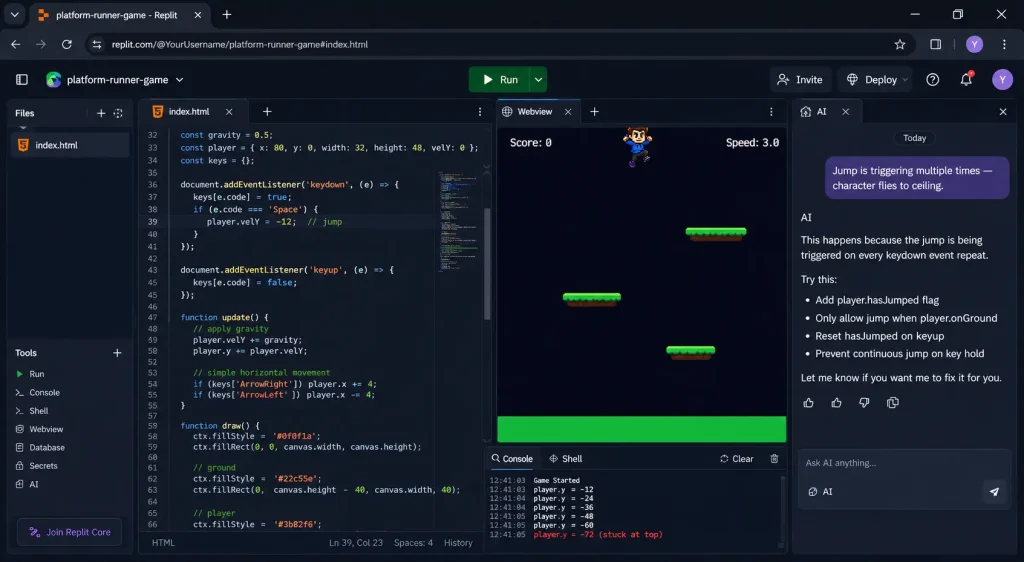
जब Jump prompt दिया:
Add jump mechanic:
– When spacebar is pressed: if player.onGround is true, set player.velY = -12
– Gravity (0.5) applied each frame will bring player back down
– Player can only jump when on ground — not mid-air
जब test करने के लिए Jump काम किया। तब Character हवा में ऊपर गया तो, लेकिन नीचे आया ही नहीं।
लेकिन एक problem और थी की जब spacebar hold करो तो jump infinite होती थी।
और तो आगे Character ceiling से टकराया और वहाँ stuck हो गया। Screen के ऊपर कोना — character वहीं रह गया।
मैंने सोचा — simple fix होगी। isJumping flag लगाने से solve हो जाएगी।
फिर भी एक बार में 3-4 jumps हो रहे थे।
यह actually एक layered bug था — 3 layers:
Layer 1 — isJumping flag सही था। यह पार्ट तो ठीक था।
Layer 2 — keydown event बार-बार fire हो रहा था जब तक key press थी। Browser का default behavior है — key hold करो तो keydown event repeat होता है। हर event पर velY = -12 set हो रहा था, चाहे character हवा में हो।
Layer 3 — Jump के पहले frame के बाद ही player.onGround false हो जाता था, लेकिन key press अभी भी process हो रही थी। इसी वजह से कई बार extra jump trigger हो जाती थी।
तीन problems एक साथ थी। इसीलिए fix prompt से bug एक बार में resolve नहीं हुआ था।
सही jump logic जो finally काम आया:
// गलत — keydown event बार-बार fire होता है key hold करने पर
document.addEventListener(‘keydown’, function(e) {
if (e.code === ‘Space’ && player.onGround) {
player.velY = -12; // यह बार-बार call होता था
}
});
// सही — एक variable track करो key state
let spacePressed = false;
document.addEventListener(‘keydown’, function(e) {
if (e.code === ‘Space’) spacePressed = true;
});
document.addEventListener(‘keyup’, function(e) {
if (e.code === ‘Space’) spacePressed = false;
});
// Game loop में — सिर्फ एक बार jump trigger करो
function handleJump() {
if (spacePressed && player.onGround && !player.hasJumped) {
player.velY = -12;
player.hasJumped = true; // एक बार jump — दोबारा नहीं जब तक land न हो
}
if (player.onGround) {
player.hasJumped = false; // land होने पर reset
}
}
तीन variables का combination था — spacePressed, player.onGround, player.hasJumped। तीनों ज़रूरी थे।
Jump Fix prompt:
Jump is triggering multiple times — character flies to ceiling.
Fix with this approach:
1. Use keydown/keyup to track spacePressed boolean (not direct action in keydown)
2. Add player.hasJumped boolean
3. In game loop: jump only if spacePressed AND onGround AND NOT hasJumped
4. Set hasJumped = true on jump, reset to false when player lands
जब यह fix हुआ — character perfectly एक jump करने लगा। 2 घंटे का debugging एक clear prompt में solve हो गया।
Platforms बनाओ — Floating और Ground दोनों
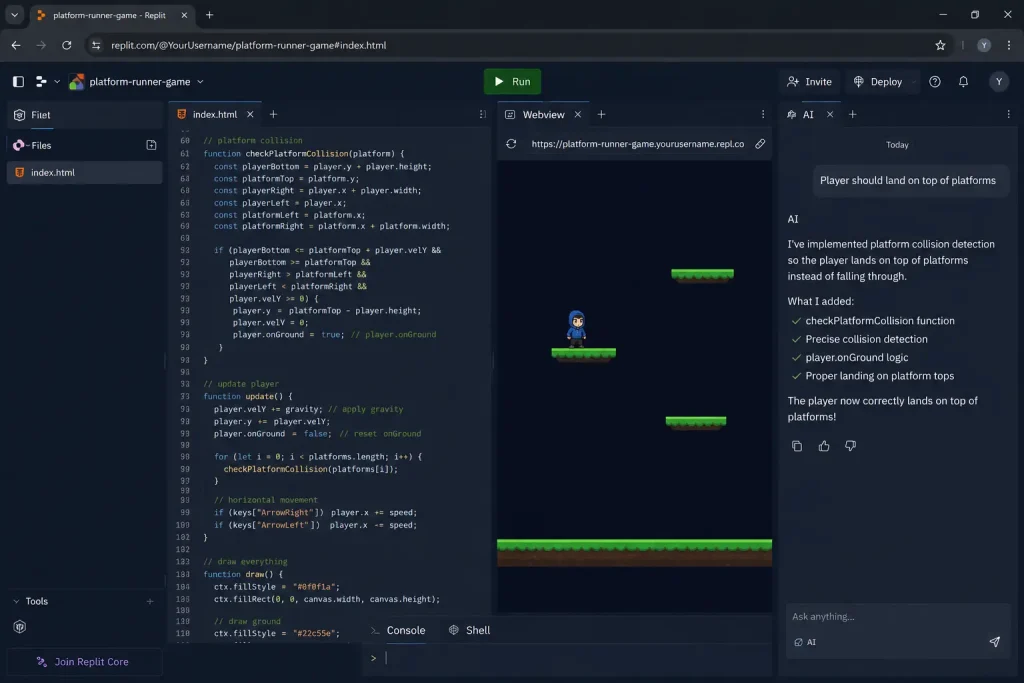
Add floating platforms to the game.
Create a platforms array with 4 platforms:
– Platform 1: x:150, y:280, width:120, height:15 (green #2d5a27)
– Platform 2: x:320, y:220, width:100, height:15
– Platform 3: x:460, y:260, width:130, height:15
– Platform 4: x:50, y:180, width:90, height:15
Player should land on top of platforms — not fall through them.
Draw platforms before drawing player.
Platforms screen पर दिखाई देने लगीं। जब character ऊपर से platform पर गिरा, तो वह उसके ऊपर रुक गया और नीचे नहीं गया। इससे confirm हो गया कि ground collision की तरह platform collision भी सही काम कर रही है।
इसमें भी लेकिन एक दिक्कत थी — character platform के through नीचे चला जाता था अगर थोड़ी speed से आता।
“Character platform के through नीचे घुस गया — जैसे ghost।”
यह दिक्कत इसलिए आई: Collision detection सिर्फ एक frame check कर रहा था। अगर character एक frame में platform से ऊपर था, अगले frame में नीचे — बीच वाला frame miss हो गया।
Platform collision का सही code:
function checkPlatformCollision(platform) {
const playerBottom = player.y + player.height;
const playerLeft = player.x;
const playerRight = player.x + player.width;
const platTop = platform.y;
const platLeft = platform.x;
const platRight = platform.x + platform.width;
// Horizontal overlap check
const horizontalOverlap = playerRight > platLeft && playerLeft < platRight;
if (horizontalOverlap) {
// ऊपर से land करना — player नीचे आ रहा था और platform की top cross की
if (player.velY > 0 &&
playerBottom >= platTop &&
playerBottom <= platTop + player.velY + 5) { // buffer ज़रूरी है
player.y = platTop – player.height;
player.velY = 0;
player.onGround = true;
}
}
}
// हर frame में हर platform के लिए check करो
platforms.forEach(platform => checkPlatformCollision(platform));
player.velY + 5 — यह buffer important है। इसके बिना fast movement में character slip through करता था।
मैंने personally test किया — platform के edge से jump करो तो character थोड़ा अंदर घुसता था पहले। इस fix ने वो भी solve किया।
Moving Obstacles — और एक और Surprise
Add moving obstacles to the game.
Create 3 obstacles (red #ff4444, 30×40px) that move from right to left.
Starting positions: x:600 y:300, x:700 y:250, x:800 y:290
Speed: 3px per frame (moving left)
If player rectangle overlaps with any obstacle: game over
Obstacles दिखाई देने लगे और सही तरह move भी कर रहे थे। लेकिन कुछ देर बाद screen खाली लगने लगी। Reason यह था कि सारे obstacles left side से canvas के बाहर निकल चुके थे और दोबारा spawn ही नहीं हो रहे थे।
Fix: Wrap-around logic — left edge से बाहर गए तो right से वापस आओ।
function updateObstacles() {
obstacles.forEach(obs => {
obs.x -= obs.speed;
// Canvas से बाहर गया left से — right से वापस लाओ
if (obs.x + obs.width < 0) {
obs.x = canvas.width + Math.random() * 200; // random gap के साथ
obs.y = groundY – obs.height – Math.random() * 80;
}
});
}
Math.random() * 200 — यह important है। अगर सब obstacles एक साथ वापस आएँ तो एक साथ तीन obstacles face करने पड़ते — impossible हो जाता।
Speed increase over time:
let gameTime = 0;
let baseSpeed = 3;
function updateSpeed() {
gameTime++;
if (gameTime % 600 === 0) { // 600 frames ≈ 10 seconds at 60fps
baseSpeed += 0.5;
obstacles.forEach(obs => obs.speed = baseSpeed);
}
}
Score System + Game Over + Restart
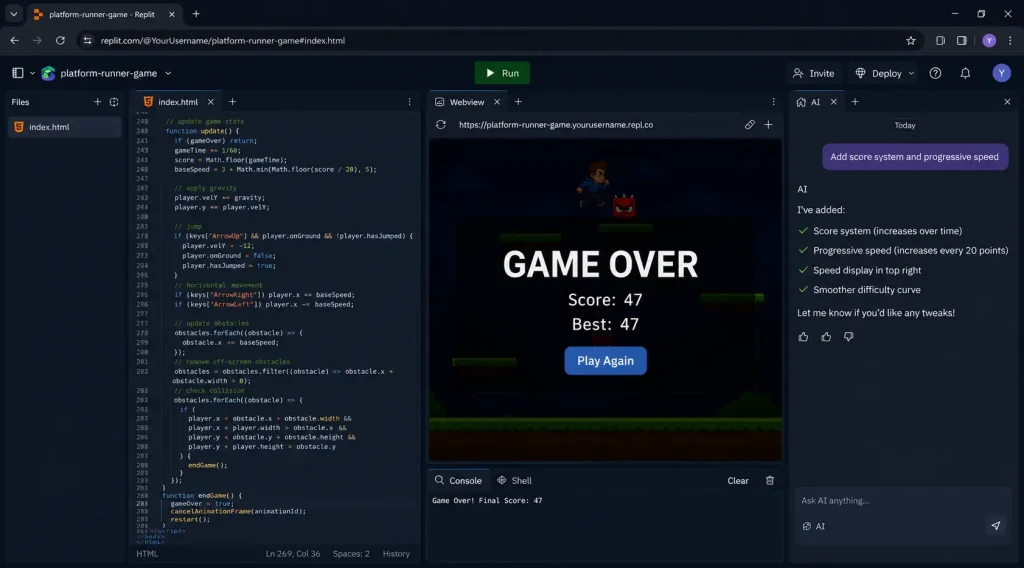
Score और Speed prompt:
Add score system and progressive speed:
– Score increases by 1 every second (every 60 frames at 60fps)
– Display score top-left: white text “Score: 0”
– When obstacles speed increases, score increases by 2 per second
– Store high score — show on game over screen
Game Over screen prompt:
Add game over screen when player hits obstacle:
– Stop game loop (cancelAnimationFrame)
– Dark semi-transparent overlay on canvas
– “GAME OVER” large white text center
– “Score: [score]” and “Best: [highScore]” below
– “Play Again” button — restart game
Restart bug: Platforms reset नहीं हो रही थी, obstacles पुरानी speed पर थे।
Character restart होता था — लेकिन speed already 4x थी। पहले second में ही game over।
// यह restart function काम नहीं करता था — incomplete reset
function restart() {
player.x = 80;
player.y = 300;
player.velY = 0;
score = 0;
gameOver = false;
gameLoop();
// PROBLEM: baseSpeed, gameTime, obstacles positions — कुछ reset नहीं हुआ
}
// सही restart — सब explicitly reset करो
function restart() {
// Player
player.x = 80;
player.y = groundY – player.height;
player.velY = 0;
player.onGround = false;
player.hasJumped = false;
// Game state
score = 0;
gameTime = 0;
baseSpeed = 3;
gameOver = false;
// Obstacles — positions और speed दोनों
obstacles.forEach((obs, i) => {
obs.x = canvas.width + (i * 250);
obs.speed = baseSpeed;
});
// Game loop fresh start
if (animationId) cancelAnimationFrame(animationId);
gameLoop();
}
Fix prompt:
Restart is not working properly — game starts at previous speed.
In restart function, explicitly reset ALL state:
– player position, velY, onGround, hasJumped
– score = 0, gameTime = 0, baseSpeed = 3
– each obstacle: reset x position and speed
– cancelAnimationFrame before calling gameLoop again
एक बात: यह दिक्कत हर game में आती है — restart में कुछ न कुछ पुरानी state रह जाती है। हमेशा explicitly हर variable reset करो।
requestAnimationFrame — क्यों setInterval यहाँ नहीं चला
मैंने शुरुआत में setInterval ही use किया था, क्योंकि Snake Game में वही ठीक काम कर रहा था। लेकिन Platform Runner में movement उतनी smooth नहीं लग रही थी। Character चलते समय हल्का-हल्का रुकता हुआ महसूस होता था, खासकर jump और landing के दौरान।
यह दिक्कत इसलिए आई:
// setInterval — fixed time पर चलता है, browser से independent
setInterval(gameLoop, 16);
// Problem: browser busy हो तो setInterval skip करता है
// Result: gravity calculation miss होती है — movement jerky लगता है
// requestAnimationFrame — browser के साथ sync होता है
function gameLoop() {
update();
render();
requestAnimationFrame(gameLoop);
}
requestAnimationFrame(gameLoop);
// Browser automatically 60fps पर call करता है
// Browser busy हो — gracefully slow करता है, skip नहीं करता
Snake Game में setInterval ठीक काम कर रहा था, क्योंकि वहाँ movement grid-based थी — snake एक cell से दूसरे cell पर जाती है। लेकिन Platform Runner में gravity, jump और collision हर frame पर update होते हैं। इसलिए movement को जितना smooth रखोगे, physics उतनी natural लगेगी। अगर canvas games पहली बार बना रहे हो तो MDN का Canvas API tutorial अच्छा starting point है।
बस setInterval की जगह requestAnimationFrame use किया, और game पहले से काफी smooth महसूस होने लगा।
Rule: Grid-based games (Snake, Cycle) → setInterval ठीक है। Physics-based games (Platform Runner) → requestAnimationFrame ज़रूरी है।
Final Game — क्या बना
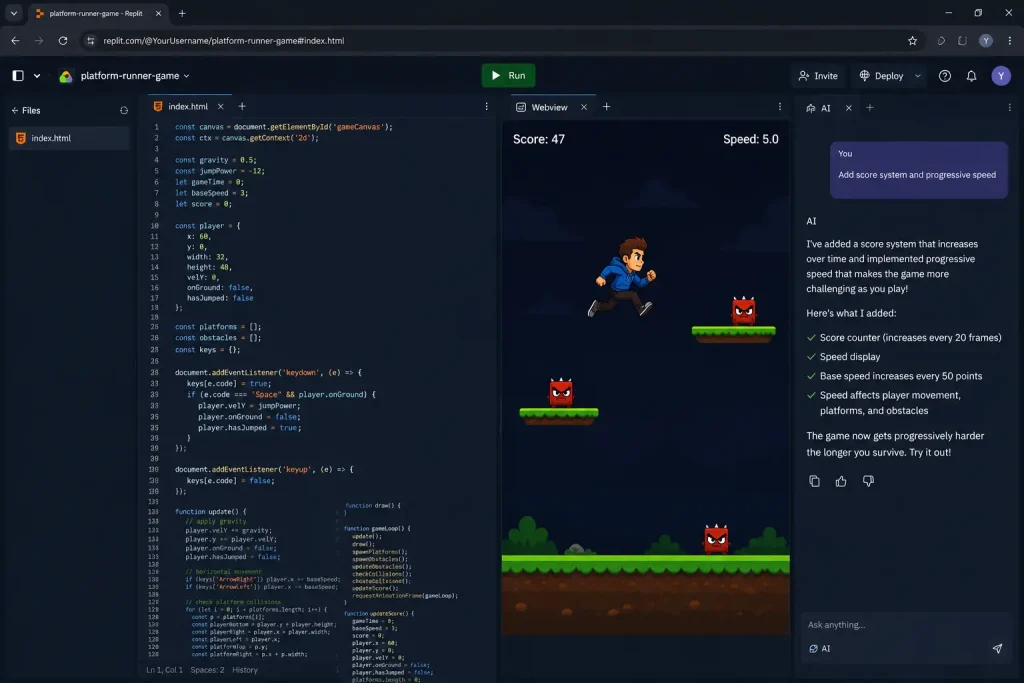
✅ Character — jump करता है, gravity naturally feel होती है
✅ Ground + 4 floating platforms — सब पर land हो सकता है
✅ 3 moving obstacles — speed बढ़ती है time के साथ
✅ Score system — survive time = score
✅ Game Over screen — score + high score
✅ Restart — completely fresh start
✅ Left/Right movement — arrow keys
✅ Jump — spacebar, सिर्फ एक बार mid-air में
इस version में क्या नहीं है
- Sprite animation (character अभी rectangle है)
- Multiple levels
- Sound effects
- Mobile touch controls
मैंने game complete होने के बाद इसे कुछ देर खेलकर test किया था। Collision, jump और obstacle speed तीनों check किए। सबसे लंबी run में करीब 47 seconds survive कर पाया, उसके बाद obstacle से टकराकर game over हो गया।
अगर आगे इसे बढ़ाना चाहो, तो coins, animated character, sound effects या अलग-अलग platform designs add कर सकते हो। Base game ready है — आगे के features उसी के ऊपर build किए जा सकते हैं।
इस Journey से जो सीखा
Insight 1 — Physics values exact numbers में दो: “Add gravity and jump” बोलने पर AI अपनी मर्ज़ी से values set करेगा। Gravity 0.5, Jump -12 — यह numbers test करके decide करो। बाद में एक value बदलो तो दूसरी भी adjust करनी पड़ती है।
Insight 2 — requestAnimationFrame vs setInterval: Movement और physics वाले games में requestAnimationFrame use करो। Snake और Cycle जैसी grid games में setInterval ठीक है। फर्क यही है — rAF browser के साथ sync होता है, smooth 60fps guaranteed।
Insight 3 — Restart function सबसे पहले लिखना चाहिए: हर game में restart function होगा। लेकिन हमेशा बाद में लिखते हैं — तब तक सारे variables add हो चुके होते हैं। Result: कोई न कोई state miss हो जाती है। Solution: restart function का skeleton पहले बनाओ — जब भी नया variable add करो, reset में भी डालो।
Normal Issues — Quick Fix
| दिक्कत | कब आई | AI को ये बोलो |
| Character floor से नीचे चला गया | Gravity add करने के बाद | “After applying gravity, check: if player.y + player.height >= groundY, set player.y = groundY – player.height and velY = 0” |
| Jump infinite हो रहा है | Jump add करने के बाद | “Use keydown/keyup to track spacePressed boolean. Add hasJumped flag. Jump only if onGround AND NOT hasJumped” |
| Character platform के through घुसता है | Platforms add करने के बाद | “Add velY buffer in collision: playerBottom >= platTop AND playerBottom <= platTop + velY + 5” |
| Obstacles वापस नहीं आते | Obstacles add करने के बाद | “If obs.x + obs.width < 0: reset obs.x = canvas.width + random(200)” |
| Restart पर पुरानी speed | Restart button add करने के बाद | “In restart: explicitly set baseSpeed = 3, gameTime = 0, reset each obstacle.speed” |
| Jerky movement था | requestAnimationFrame की जगह setInterval | “Replace setInterval with requestAnimationFrame loop” |
| Double jump हो रहा था | hasJumped flag नहीं लगाया | “Add player.hasJumped = true on jump. Reset to false only when player.onGround becomes true” |
मेरा Transparency Note (Dislaimer)
यह game मैंने Replit AI से actually build करके देखा है। Double jump bug, platform ghost-through bug, obstacles वापस न आना — यह सब मैंने खुद face किए। requestAnimationFrame वाली switch भी actually की थी — तब समझा कि फर्क क्या है।
4 घंटे लगे। वो सच है।
Replit एक third-party platform है — features और pricing बदल सकती है। Latest जानकारी के लिए replit.com check करो।
यह article किसी tool के साथ sponsored नहीं है।
FAQ
Platform runner में gravity value कितनी रखें कि natural लगे?
0.5 per frame सबसे balanced value है। 0.3 से नीचे — character floating लगता है, real weight नहीं feel होती। 0.7 से ऊपर — character इतना fast गिरता है कि jump control करना मुश्किल हो जाता है। Jump strength gravity के साथ scale होती है — gravity 0.5 है तो jump -12 perfect है। Gravity बढ़ाओ तो jump strength भी बढ़ाओ।
setInterval और requestAnimationFrame में क्या फर्क है — कब कौन सा use करें?
setInterval fixed time पर चलता है — browser busy हो तो delay या skip हो सकता है। requestAnimationFrame browser के display refresh के साथ sync होता है — always smooth। Grid-based games (Snake, Tractor) में setInterval ठीक है। Physics-based games (Platform Runner) में requestAnimationFrame ज़रूरी है — एक भी frame miss हो तो gravity calculation टूट जाती है।
Moving obstacles बहुत fast हो जाते हैं — speed progression कैसे control करें?
हर कितने seconds में speed बढ़नी चाहिए और कितनी — यह दो values tune करो। “हर 10 seconds में 0.5x increase, maximum 8x” — यह एक comfortable curve है। Maximum speed cap लगाना ज़रूरी है — वरना एक point आता है जब obstacles screen पर flash करके निकल जाते हैं, avoid करना physically impossible हो जाता है।
Character platform के through घुस जाता है — एक line में fix क्या है?
एक line fix नहीं है — यह collision detection का issue है। सही fix: playerBottom >= platTop AND playerBottom <= platTop + player.velY + 5 — यह buffer ensure करता है कि fast movement में भी collision detect हो। सिर्फ playerBottom >= platTop check करने से fast-moving character slip through करता है।
क्या यह game mobile पर भी खेलने लायक बनाया जा सकता है?
हाँ — लेकिन platform runner के लिए सिर्फ swipe काफी नहीं। Jump के लिए screen tap, left/right के लिए left-right swipe — यह combination add करना पड़ेगा। Alternative: canvas के नीचे 3 buttons — Left, Jump, Right। Mobile पर buttons platform runner के लिए swipe से better feel देते हैं — Snake game से उलटा।